
Explainer Video Script Template
This explainer video script template builds a word budget for each section of your video. Choose a video type, a length from 15 seconds to 10 minutes and a speaking pace, and the tool drafts each section from your answers and shows the reading time of the result. Missing details become [ADD] notes rather than invented facts.
Free · runs in your browser · nothing is uploaded
This explainer video script template builds the script instead of showing you a table. Pick a video type, a length and your speaking pace, and each section gets a word budget: hook, problem, solution, how it works, proof and call to action for an explainer, with other sections for a sales video, an ad or a short-form clip for TikTok, Reels and Shorts. A draft fills in from your answers, and a field you leave empty becomes an [ADD: ...] note, never an invented fact. You see how each section compares with its budget and how long the finished script takes to read. Then copy it, download it or send it to the teleprompter.
Measure your own speaking pace with the Speaking Speed Test before you set the pace in this tool.
At a glance
An explainer video script template is a fixed layout you reuse for each video, with the same section order and word budgets and new wording each time. This tool fills that layout from your answers and shows how each section compares with its budget.
- At 140 words per minute, a 60-second explainer has 2 seconds of planned pauses, 58 seconds of speech and 136 words.
- You can set any pace from 60 to 300 words per minute.
- You can enter a custom length from 15 to 600 seconds.
- A section is short when it is under 85% of its budget, on budget at 85 to 115%, and long when it is over 115%.
- Send to teleprompter hands the script to the teleprompter on the home page, which picks it up within 30 minutes.
Last checked:
How to use the explainer video script template
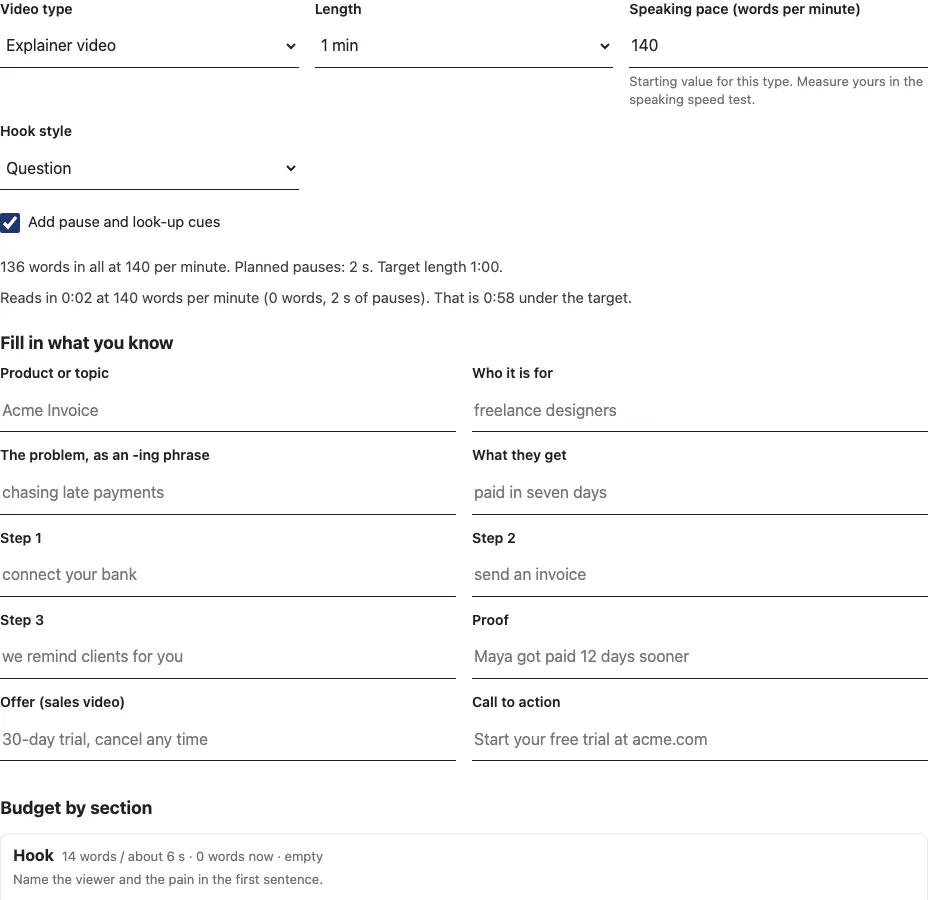
- Choose a Video type: Explainer video, Sales video, Ad, or Short-form for TikTok, Reels and Shorts.
- Pick a length from the list for that type, or enter an Other length from 15 to 600 seconds.
- Check the pace. Each type starts at its own value (140 words per minute for explainers, 150 for sales videos and ads, 160 for short-form), and you can set any pace from 60 to 300.
- Leave Add pause and look-up cues on to plan pauses and a
[LOOK UP]before the call to action, or turn it off. - Fill in Product or topic, Who it is for, The problem, as an -ing phrase, What they get, Step 1 to Step 3, Proof, Offer (sales video) and Call to action.
- Choose a Hook style: Question, Number, Challenge a belief or Mini story.
- Read each section box. It shows its word budget and seconds, the words you have now and a status: short (under 85% of the budget), on budget (85 to 115%) or long (over 115%).
- Edit any section directly. Your edits stay when you change a field. Rewrite from the fields replaces every section with a new draft.
- Check the reading time above the script, then press Copy script, Download .txt or Send to teleprompter.
Settings and fields are kept in the page address. Send to teleprompter hands the script to the teleprompter on the home page, which picks it up within 30 minutes.
How many words should an explainer video script be?
Multiply the seconds of speech by your pace in words per minute and divide by 60. The tool also takes off the pauses it plans before counting words, so the budget is for speech only. At 140 words per minute a 60-second explainer has 2 seconds of planned pauses, 58 seconds of speech and 136 words.
| Video type (default pace) | Length | Words |
|---|---|---|
| Explainer (140) | 30 s / 60 s / 90 s / 2 min / 3 min | 66 / 136 / 207 / 277 / 417 |
| Sales video (150) | 1 min / 3 min / 5 min / 10 min | 140 / 440 / 740 / 1,490 |
| Ad (150) | 15 s / 30 s / 45 s / 60 s | 35 / 74 / 111 / 149 |
| Short-form (160) | 15 s / 30 s / 60 s / 90 s | 39 / 78 / 158 / 239 |
VideoIgniter lists about 125 to 150 words for 60 seconds and Vidico 150 words a minute for professional narration. Your number depends on your voice, so test it with the speaking speed test.
What is the best explainer video script template?
No layout fits every product, so the tool starts from shares you can check and change. For a 60-second explainer at 140 words per minute they give:
| Section | Share of speaking time | Seconds | Words |
|---|---|---|---|
| Hook | 10% | 5.8 | 14 |
| Problem | 18% | 10.4 | 24 |
| Solution | 17% | 9.9 | 23 |
| How it works | 30% | 17.4 | 41 |
| Proof | 13% | 7.5 | 18 |
| Call to action | 12% | 7.0 | 16 |
Peers split the minute differently. Vidico’s published template is Problem 30%, Solution 40%, Proof 20% and Action 10%, and VideoIgniter’s 60-second table runs hook and problem 0-10 s, solution 10-20 s, how it works 20-45 s, proof 45-55 s and call to action 55-60 s. Ours gives the hook its own slot and the steps the biggest share. These shares are this tool’s own starting point, not a published standard.
How do I write a 30-second video script?
Aim for about 74 words for a 30-second ad and 78 for a short-form clip. Set the length, fill in the fields, then trim any section marked long.
- Set Video type to Ad or Short-form and choose 30 s.
- Fill in Product or topic, Who it is for and The problem, as an -ing phrase, for example “chasing late payments”.
- Write What they get and Proof. Make the proof a number or a named source. An empty field leaves an
[ADD: ...]note. - Pick a Hook style. An ad hook gets 15 words, a short-form hook 8 words in 3 seconds.
- Check that each section is on budget and the reading time is close to 30 seconds.
What goes into a TikTok, ad or sales video script template?
The four presets share one idea (hook, value, one action) and differ in proportions.
| Type | Sections, in order | Planned pauses |
|---|---|---|
| Explainer | hook 10, problem 18, solution 17, how it works 30, proof 13, call to action 12 | 1 s after the hook and the solution |
| Sales video | hook 6, problem 12, what it costs 10, solution 12, how it works 20, proof 14, offer 10, objection 8, call to action 8 | 1 s after the hook, 1.5 s after what it costs, 1 s after the offer |
| Ad | hook 20, problem 15, solution 30, proof 20, call to action 15 | 0.5 s after the hook |
| Short-form (TikTok, Reels, Shorts) | hook fixed at 3 s, then setup 20, value 50, payoff 18, call to action 12 | 0.5 s after the hook |
A 30-second short-form video at 160 words per minute has 78 words, 8 of them in the hook.
Worked example: a 60-second explainer
With example fields (Acme Invoice, freelance designers, chasing late payments) the tool drafts this, headings omitted:
Freelance designers, are you still chasing late payments? [PAUSE 1s]
Chasing late payments eats time you do not have. [ADD: one concrete cost, in minutes or money]
Meet Acme Invoice: it helps freelance designers get paid in seven days. [PAUSE 1s]
First, connect your bank. Then, send an invoice. Finally, we remind clients for you.
Maya got paid 12 days sooner.
[LOOK UP] Start your free trial at acme.com.
The draft has 55 spoken words and reads in 28 seconds at 140 words per minute, half of the 60 asked for. So how it works, proof and the problem show as short, and the [ADD] notes are not counted.
Where does this structure come from?
AIDA (attract attention, maintain interest, create desire, get action) is credited to the advertising writer E. St. Elmo Lewis. According to Edward K. Strong, Lewis formulated “attract attention, maintain interest, create desire” in 1898 and added “get action” later; the acronym came afterwards. StoryBrand, by Donald Miller (2017), frames a story as a customer with a problem who meets a guide with a plan and is called to act. Made to Stick (Chip and Dan Heath, 2007) argues for concrete, credible messages, which is why proof is a number or a named source here.
How this tool works and where the numbers come from
Words = (length in seconds - planned pauses) x pace / 60, split by each section’s share of the speaking time. Planned pauses are the cue seconds the tool adds (1 s after the hook and after the solution in an explainer, for example) and are taken off before the words are counted. The reading time of the finished script uses the same engine as the script timer: spoken words at your pace, plus the pause cues and a 0.4 s breath after each paragraph. Default paces (explainer 140, sales video 150, ad 150, short-form 160 words per minute) are starting values, not measured norms. The section shares are this tool’s own starting point; peers publish different ones, shown on the page.
Sources
- Wikipedia, E. St. Elmo Lewis: credited with AIDA (attract attention, maintain interest, create desire, get action); per Edward K. Strong he formulated the first three terms in 1898
- Donald Miller, Building a StoryBrand (HarperCollins Leadership, 2017): a customer with a problem meets a guide with a plan and is called to act
- Chip Heath and Dan Heath, Made to Stick (Random House, 2007): simple, unexpected, concrete, credible, emotional messages and stories
- VideoIgniter, Explainer Video Script Examples + Free Template: 60-second structure and word ranges, read 2026-10-25
- Vidico, Explainer Video Script Examples: Problem 30%, Solution 40%, Proof 20%, Action 10%, read 2026-10-25
Questions, briefly answered
What is a video script template?
A fixed layout you reuse for each video: the same section order and word budgets, with new wording every time. This tool fills that layout from your answers and keeps the sections in order. The worked 60-second example above is a sample explainer video script to adapt.
How long is a 60 second script?
A 60-second explainer at 140 words per minute has 58 seconds of speech and 136 words. A 60-second ad at 150 has 149 words and a short-form clip at 160 has 158, because each type starts at its own pace and plans its own pauses.
Can AI tools write my video script for me?
This tool does not use AI to write. It fills sections from the text you enter and marks missing details with [ADD] notes. Check accuracy, brand voice and audience fit before you publish, whoever or whatever wrote the draft.
How do I make my explainer script engaging?
Write the way you talk, in sentences short enough for one breath. Use a specific example instead of a vague claim, and name the viewer’s problem in the hook so they recognise themselves in the first sentence.
Do social videos need a two-column format?
Very short clips can work with one column of spoken words and on-screen cues. A script still helps you time captions, music and quick graphics, because you can see where each beat falls.
Can I reuse the same script for different products?
Reuse the section order, not the words. Change the product fields and press Rewrite from the fields. That replaces every section, including text you edited, so copy your old script first.
What makes a good hook for TikTok or Reels?
Name the viewer and the problem in the first sentence. The short-form hook is fixed at 3 seconds, about 8 words at 160 words per minute. Try the four hook styles: Question, Number, Challenge a belief and Mini story.
What is the structure of a sales video script?
Hook, problem, what it costs, solution, how it works, proof, offer, objection and call to action, with shares of 6, 12, 10, 12, 20, 14, 10, 8 and 8 percent of the speaking time. Pauses sit after the hook, after what it costs and after the offer.
Related tools
- Script Formatter: clean a finished script, with pause cues.
- Script Timer: time it section by section.
- Speaking Speed Test: measure your own pace first.
- Teleprompter Speed and Font Size: set a scroll speed and font size.
- Mirror Text: flip text for a glass teleprompter.
- Read a Script Naturally: mark a script so it sounds like speech.