
How to Use a Teleprompter
How to use a teleprompter: put the text next to the lens and set a speed you can speak at. The five-step practice runs on a working prompter and ticks each step off as you complete it. It ends with your measured words per minute, and the free plan includes 5 completed prompting sessions per month.
Free · runs in your browser · nothing is uploaded
How to use a teleprompter: put the text next to the lens, set a speed you can speak at, and let your eyes take in a short phrase at a time while you look back at the camera between phrases. Reading every word one after another is what makes people look as if they are reading. The practice above runs on the same prompter as the home page with a short script made for this page. It starts too fast on purpose, because adjusting the speed is the first skill, and it ends by telling you how fast you really read.
The free plan includes 5 completed prompting sessions per month, with or without recording. Pro includes unlimited sessions.
Run the five-step practice on this page, then load your own script in the online teleprompter.
At a glance
To use a teleprompter, put the text next to the lens, set a speed you can speak at, and let your eyes take in a short phrase at a time while you look back at the camera between phrases.
- The prompter starts at 190 words per minute, and step 1 asks you to press the minus button until the speed shows 110 to 160.
- Eye travel is 2 x atan(width / 2 / distance) in degrees, so a 30 cm text width seen from 100 cm gives 17.1 degrees.
- Prompterline's own rule of thumb, not a published standard, says under 8 degrees of eye travel is hard to see, 8 to 14 is workable, and above 14 looks like reading.
- The free plan includes 5 completed prompting sessions per month, with or without recording.
- Laubrock and Kliegl's 2015 study of reading aloud found the eyes were on average about 10 letters ahead of the voice, around 560 milliseconds.
Last checked:
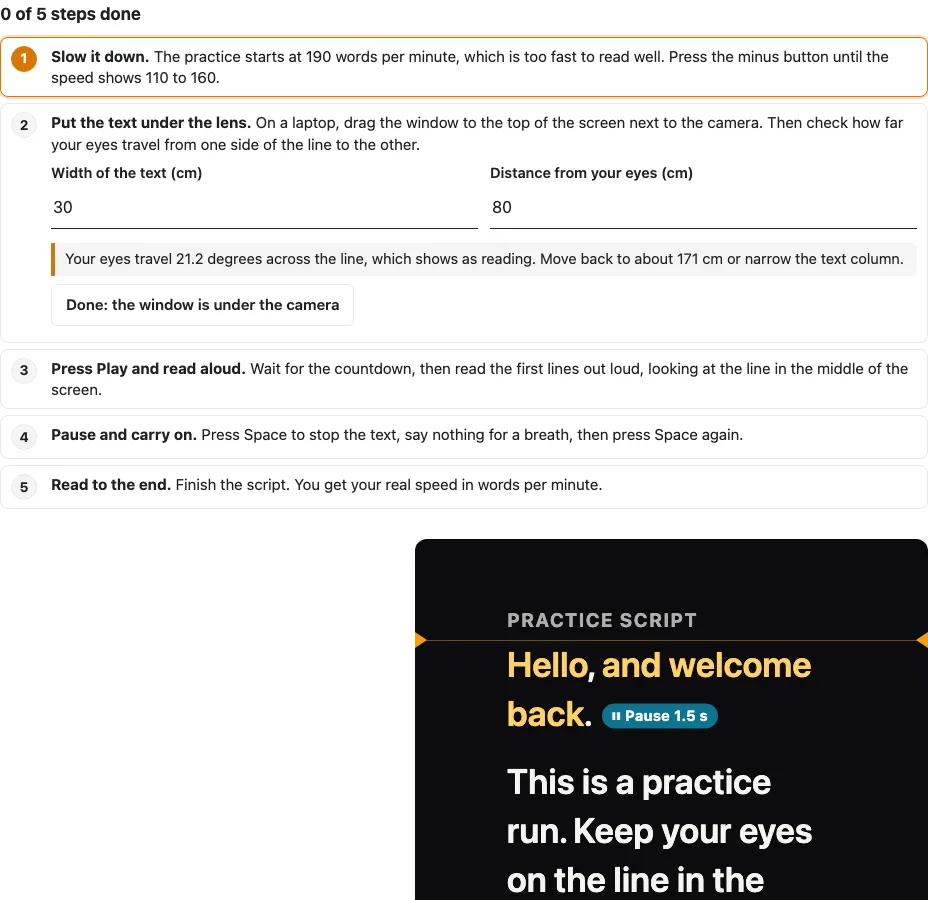
How to use the practice
- Slow it down. The prompter starts at 190 words per minute. Press the minus button until the speed shows 110 to 160.
- Put the text under the lens. On a laptop, drag the window to the top of the screen next to the camera. Type the width of the text and the distance from your eyes in the calculator, read the eye travel it gives, then press Done: the window is under the camera.
- Press Play and read aloud. A short countdown runs first. The step ticks when a fifth of the script has played.
- Pause and carry on. Press Space to stop the text, breathe, press Space again.
- Read to the end. The page shows how many words per minute you read and how long the script was planned to take at your speed.
Press Start the practice again to run it a second time; the steps reset and the speed goes back to 190 words per minute. Large type helps all five steps, so use the text-size buttons before step 2 if your eyes sweep across the line. Your own script goes into the online teleprompter, and you can send a marked script there from Read a script naturally.
How do you read a teleprompter without moving your eyes?
You cannot read with no eye movement, but you can make the movement too small to notice. Keep the text column narrow, put it close to the lens, and sit farther back. The less your eyes swing from side to side, the less it looks like reading.
Eye travel is a matter of geometry: 2 x atan(width / 2 / distance). The calculator in step 2 does it for you. These are worked examples:
| Text width | Distance from your eyes | Eye travel | Verdict |
|---|---|---|---|
| 30 cm | 100 cm | 17.1° | Reads as reading |
| 30 cm | 171 cm | 10.0° | Workable |
| 20 cm | 200 cm | 5.7° | Hard to see |
The bands are Prompterline’s own rule of thumb, not a published standard: under 8 degrees is hard to see, 8 to 14 is workable and above 14 looks like reading. Thomas Frank, a video creator, gives the same advice in words: the farther the text is from the lens, the more the eyes have to travel, and a narrow column helps.
You also need only a few words ahead. Laubrock and Kliegl measured the eye-voice span in a study of reading aloud, published in 2015: at the end of a fixation the eyes were on average about 10 letters ahead of the voice, around 560 milliseconds. Narrow lines break at phrase boundaries, so each glance gives you the next phrase.
What speed should a teleprompter run at?
A sensible start in English is 130 to 150 words per minute, adjusted to your own voice. Debatrix gives 110 as a slow pace, 140 as average and 170 as fast. The home-page prompter starts at 150, and the minus and plus buttons change it by 5. A faster scroll than you can speak makes you chase the text.
Slower is often better on camera. Vicky Nguyen, an NBC News co-anchor, says slow reading gives you time to be expressive and to correct the prompter, and her colleague Brian Cheung says it makes you more intentional about the tone. To find your own number, run the practice and read the words per minute it reports, or use the speaking speed test. The teleprompter speed page turns that pace into a scroll speed and a font size, and the script timer tells you how long a script will run.
How do you use a teleprompter without sounding like you are reading?
Know the script before you scroll it, and say it the way you would say it to one person. The prompter is a reminder, not a script to recite. Frank says the best readers look into the lens and read the lines peripherally, which is easier once you have practised the script a couple of times.
Practical habits from the people who do this for a living:
- Read the script aloud the day before and time it, then trim any lines that trip you up (Four Winds Creative).
- Record one take reading and one from memory, and keep the better one (Frank).
- Use your hands and move your head. The Slanted Lens says not to stand like a robot.
- Laura Jarrett of NBC says she was taught not to stop at every full stop but to keep going.
Read a script naturally covers the writing and phrasing side with a tool that marks where to breathe and what to stress.
What if I use a laptop or phone screen instead of glass?
Without glass, the screen is not in line with the lens, so the closer you put the text to the camera, the better. On a laptop, drag the prompter window to the top of the screen, next to the camera, and use the calculator in step 2 to check the eye travel. On a phone, hold it as near the lens as you can. The front camera is at the top edge, so the text should start there.
In a phone browser, tap the text to play or pause and, in full screen, drag it to move back or forward. This is tested in browser emulation, not on every real phone. For the glass effect use the mirror button with a glass rig; what is a teleprompter shows how the glass works.
How this tool works and where the numbers come from
The five steps are checked by the prompter’s own events: the speed setting, the play state, the position in the script and the end of the script. Eye travel is 2 x atan(width / 2 / distance), shown in degrees. The bands in step 2 (under 8 degrees, 8 to 14 degrees, above 14 degrees) are Prompterline’s own rule of thumb, not a published standard. The final result divides the words of the practice script by the time the prompter measured and compares it with the speed you set. Advice from other people is attributed to them by name.
Sources
- Laubrock and Kliegl (2015), The eye-voice span during reading aloud, Frontiers in Psychology (eyes about 10 letters ahead of the voice, about 560 ms)
- Thomas Frank, Working with a teleprompter (distance, narrow column, two takes), read 2026-10-25
- Four Winds Creative, On-Camera 101: How to Use a Teleprompter Like a Pro (rehearse, operator, contrast), read 2026-10-25
- The Slanted Lens, 9 tips on how to use a teleprompter (large type, cues, hands), read 2026-10-25
- NBCU Academy, How to Use a Teleprompter (advice from NBC News anchors), read 2026-10-25
- Debatrix, Speech calculator (English: slow 110, average 140, fast 170 words per minute), read 2026-10-25
Questions, briefly answered
Why use a teleprompter?
A teleprompter keeps your words at the lens, so you can deliver an exact script and still look at the camera. It helps most when the wording matters, as in a product video or a speech with figures. Notes on a desk make you look down, which viewers read as distraction.
Should I memorise my script as well?
You do not have to, but it helps to know it well. Frank suggests one take reading and one from memory, because memory takes pressure off the prompter. Four Winds Creative suggests turning the script into bullet points, which also reduces the words on screen.
What if the teleprompter stops working?
Have a printed copy of the script within reach. At NBC, Yasmin Vossoughian says anchors keep backup paper scripts at the desk in case the prompter fails. Know your first and last lines well enough to carry on from the page.
Do I need someone to operate it?
Not with this prompter, which you control yourself with Space, a tap, or a clicker or foot pedal that sends Page Up and Page Down. In a studio an operator follows the speaker and can slow down or pause, which a fixed speed cannot.
Which colours and fonts work best?
White text on black is the studio standard, according to a video professional quoted by Four Winds Creative. The prompter offers white on black, black on white, amber, yellow on black and green, with system fonts, so try two or three.
How do I use a teleprompter on an iPhone?
Open the prompter in the phone’s browser, paste your script, tap the text to play and pause, and use the full-screen button. The phone’s screen is not in line with the lens, so hold it close to the camera. On an iPhone the full-screen view fills the browser window. This is emulation-tested, not tested on a real iPhone.
How do I practise with a teleprompter?
Run the five steps above, then read your own script aloud twice before you record. Four Winds Creative suggests timing it the day before, and NBC’s Maya Eaglin says to practise a few times before the first real use. Check the length with the script timer.
How fast should I read on a teleprompter?
A sensible start in English is 130 to 150 words per minute, adjusted to your own voice. Debatrix gives 110 as a slow pace, 140 as average and 170 as fast. The home-page prompter starts at 150, and the minus and plus buttons change it by 5. Run the practice to see your own words per minute at the end.
Related tools
- Online teleprompter: load your own script and run it at your pace.
- Read a script naturally: mark breath groups, stress and pauses in your script.
- Speaking speed test: measure your own words per minute.
- Teleprompter speed: turn your pace into a scroll speed and a font size.
- Script timer: see how long a script takes before you record.
- What Is a Teleprompter: see how the glass and screen work.
- Teleprompter guides: the whole group in one place.