
Mirror Text
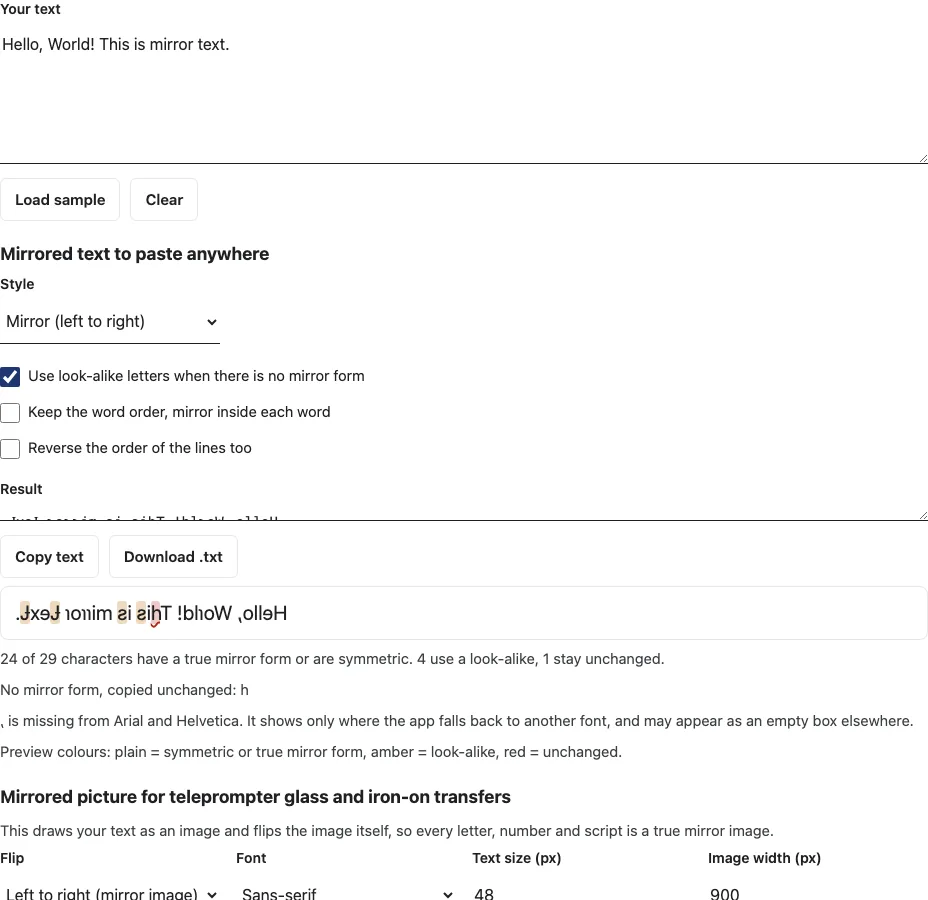
Mirror text swaps each letter for its mirror shape and reverses the order of the characters on each line, so you can paste it anywhere. Type your text, pick a Style, and the report shows which characters could not be mirrored. Letters such as g, h, j and k have no mirror character, so they stay unchanged and show red; the picture mode flips them properly.
Free · runs in your browser · nothing is uploaded
Mirror text has two jobs, and this page does both. The first part converts your text into Unicode characters that look mirrored, so you can paste it into a post, a chat or a document. It tells you honestly which characters could not be mirrored and stay as they were. The second part draws your text as a picture and flips the picture itself, so every letter, digit and script is a true mirror image. Use it for a glass teleprompter, a mirror sign or an iron-on transfer. Settings are kept in the page address, never your text, and the report tells you what to expect before you paste. It is also a reverse mirror online: mirrored, upside-down or backwards text to copy.
Type or paste your text into the tool and read the report under the result before you copy it.
At a glance
Mirror text is text where each letter is swapped for its mirror shape and the order of the characters on each line is reversed. The Mirror (left to right) style does both, and the report lists the characters that stay unchanged.
- Of the 62 letters and digits (a-z, A-Z, 0-9), the tool counts 21 that look the same mirrored, 16 with a mirror-shaped character in Unicode, 13 with only a look-alike, and 12 with nothing to use.
- Sixteen characters are in none of Arial, Helvetica, Times New Roman, Courier New and SF Pro, and the tool warns you when your result contains one.
- On 2026-10-25 the page looked up the 66 non-ASCII characters the tool can output in ten macOS system fonts, and Arial has 44 of them, Helvetica 46, and Times New Roman 44.
- Set Tool to Reverse (backwards text) to use one of five order-only modes: All characters, Letters in each word, Word order, Line order, or Flip each line.
- Settings are kept in the page address, never your text.
Last checked:
How to use the mirror text generator
Start with the first part if you want mirrored or backwards text to paste into an app. The second part makes pictures. To only reverse the order, set Tool to Reverse (backwards text).
- Type or paste your text into the input box.
- Open the Style list and pick one: Mirror (left to right), Upside down (turned 180°), Backwards only, or Mirror letters, keep order.
- Tick the options you need. Use look-alike letters when there is no mirror form is on by default. Keep the word order, mirror inside each word and Reverse the order of the lines too are optional. For Upside down, reversing the lines gives a true 180 degree turn.
- Read the report under the result. It counts symmetric, true mirror, look-alike and unchanged characters. In the preview, amber marks look-alikes and red marks characters that stay as they were.
- Press Copy text, or Download .txt to save the result.
For a picture, scroll to the second part, set Flip to Left to right, choose a font, size and colours, then press Download PNG. Copy image appears only where your browser can put an image on the clipboard. Press Escape to close Full screen, mirrored. Use the picture for Arabic, Hebrew and print jobs. In the text part the browser lays out right-to-left letters itself, so check the order; the tool warns you when it sees them.
How do I mirror my text?
Mirroring does two things at once: each letter is swapped for its mirror shape, and the order of the characters on each line is reversed. The Mirror (left to right) style does both. Backwards only does just the reversal, and Mirror letters, keep order does just the swap.
Take “Mirror text generator”. The tool turns it into ɿoɈɒɿɘᴎɘg ɈxɘɈ ɿoɿɿiM. Of its 19 letters, 5 are symmetric, 8 have a true mirror shape, 5 get a look-alike and the g stays unchanged, shown in red.
Which characters can be mirrored?
Of the 62 letters and digits (a-z, A-Z, 0-9), the tool counts 21 that look the same mirrored, 16 with a mirror-shaped character in Unicode, 13 with only a look-alike, and 12 with nothing to use.
| Group in Mirror mode | Count | Characters |
|---|---|---|
| Symmetric, stays as it is | 21 | i l m o u v w x A H I M O T U V W X Y 0 8 |
| Mirror-shaped character | 16 | b d c e f p q r C E F L N P R 3 |
| Look-alike only | 13 | a n s t y z B D J K Q S Z |
| No mirror form, unchanged | 12 | g h j k G 1 2 4 5 6 7 9 |
The mirror-shaped characters include ɘ (U+0258 reversed e), Ǝ (U+018E reversed E), ꟻ (U+A7FB reversed F), ɿ (U+027F reversed r with fishhook) and ⅃ (U+2143 reversed sans-serif L), plus ⸮ for a question mark. Я, И, Ɔ and Ɛ are letters of other alphabets that happen to have the mirror shape. Brackets and quotes swap places, as the Unicode file BidiMirroring.txt lists them as mirrored pairs. Letters like g, h, j and k have no mirror character, so they stay and show red; the picture mode flips them properly.
Do mirrored letters show in every font?
Not always. On 2026-10-25 we looked up each of the 66 non-ASCII characters this tool can output in the character map of ten macOS system fonts. Arial has 44 of them, Helvetica 46, Times New Roman 44, Courier New 42, Menlo 42, SF Pro 29, and Georgia and Verdana only 9 each. Where a font lacks a character, the system usually borrows it from another font, or shows an empty box. Sixteen characters are in none of Arial, Helvetica, Times New Roman, Courier New and SF Pro, and the tool warns you when your result contains one. Only macOS fonts were checked.
Emoji and spaces are copied as they are.
Backwards (reversed) text: reverse characters, words or lines
Set Tool to Reverse (backwards text) and the page works as a backwards text generator. Reversing changes the order and never the letter shapes, which is the difference from mirrored text. It does not translate: a “backwards translator” is the same reverse. Five modes use the same input box:
| Mode | Input | Output |
|---|---|---|
| All characters | Hello world | dlrow olleH |
| Letters in each word (word reverser) | Hello world | olleH dlrow |
| Word order | Hello big world | world big Hello |
| Line order | Red, Blue, Green (3 lines) | Green, Blue, Red |
| Flip each line | Hello world, Good night (2 lines) | dlrow olleH, thgin dooG |
A plain reverse can cut a flag, a family emoji or a letter with a separate accent mark into pieces. This tool first splits the text into user-perceived characters (Unicode extended grapheme clusters, with Intl.Segmenter or a fallback), so emoji, flags, accents and CJK stay whole. The browser lays out Arabic and Hebrew right to left itself, so check their order.
How do I mirror text for a teleprompter or an iron-on transfer?
Use the second part, because it flips a picture and not the characters. Mirror the text or the screen once, never twice.
A teleprompter reflects the words to the presenter through clear glass, and iron-on vinyl is cut face down, so Cricut’s help says to mirror the design before cutting.
- Type your text and set the font, size and colours.
- Set Flip to Left to right for a mirror image.
- For a teleprompter, press Full screen, mirrored and do not flip it again in your prompter software.
- For iron-on, press Download PNG at 2× or 3×. If your cutting software has its own mirror switch, set Flip to None here.
The picture is drawn on a canvas and the canvas is flipped: in a browser test a left-to-right flipped L put all its ink in the right half of the image.
How this tool works and where the numbers come from
Part 1 reverses each line by grapheme and replaces each character from a hand-checked table: symmetric letters stay, letters with a mirror-shaped Unicode character use it, bracket pairs follow the Unicode Bidi_Mirrored pairs, other letters use a look-alike or stay unchanged. Every character in the table was checked against its Unicode name. Font coverage is a character-map (cmap) lookup of ten macOS system fonts on 2026-10-25; Windows, Android and the fonts inside apps were not checked. The Reverse tool splits text into extended grapheme clusters and reverses those units; unit tests cover emoji, a combining accent, a flag, a family emoji, CJK text and the fallback. Part 2 draws the text on a canvas and flips the canvas, so no character is substituted.
Sources
- Unicode Standard Annex #29, Text Segmentation: extended grapheme clusters
- MDN Web Docs, Intl.Segmenter
- Unicode Character Database, BidiMirroring.txt, version 18.0.0 (2026-02-03): pairs of characters whose glyphs are mirror images
- Wikipedia, Teleprompter: words reflected to the presenter with a sheet of clear glass or other beam splitter; monitor scanning reversed to compensate for the reflection
- Cricut Help, heat transfer vinyl is cut face down, so mirror the design before cutting
Questions, briefly answered
What is mirror writing?
Mirror writing is writing that runs right to left with every letter reflected, so it reads correctly only in a mirror. The Mirror (left to right) style imitates it with Unicode characters, and the picture mode draws it exactly.
How do I mirror text on an iPhone or Android phone?
Open this page in the phone’s browser, type your text, pick a Style and tap Copy text, then paste it where you need it. For a picture, set Flip to Left to right and use Download PNG, or Copy image if the button is shown.
How do I write backwards or reverse text online?
Paste your text, set Tool to Reverse (backwards text), keep All characters and press Copy. This reverse text generator changes only the order, and the output appears as you type. For backwards letters inside each word with the word order kept, pick Letters in each word.
Does reversing text keep emoji and accented letters whole?
Yes. The reverse modes work on whole characters, so emoji, flags, accented letters and CJK characters are not split or broken. Nothing is sent to a server.
How do I mirror text in Word?
In Word, draw a text box, open Format Shape, Effects, 3-D Rotation, and set 180 degrees (X flips left to right, Y top to bottom; menus vary by version). For text to paste anywhere, use the first part of this page.
Can I reverse the mirroring (un-flip the output)?
Paste the result back into the input and choose the same Style. It works for text made here, with one exception: f and F share one reversed character, so both come back as F.
Will screen readers pronounce mirror text correctly?
No. Screen readers read unusual characters one by one or skip them, so do not use mirror text for anything that must be understood, such as a link, a name on a form or an announcement.
Does mirrored text work with languages other than English?
The first part is built for the Latin alphabet and digits. Letters of other scripts keep their shapes and only their order changes, and the browser lays out Arabic and Hebrew right to left itself, so check the result. The picture mode mirrors any script, Chinese and emoji included.
Related tools
- Script Formatter: clean a script before you mirror it.
- Script Timer: time a script read aloud.
- Teleprompter Speed and Font Size: turn your pace into a scroll speed and font size.
- Video Script Builder: draft a script from a length and a pace.
- Speaking Speed Test: measure your words per minute.
- Read a Script Naturally: mark a script so it sounds like speech.