
Script Formatter
The script formatter cleans a pasted script for reading aloud by removing what a speaker should not say. You paste text or import a .txt, .md or .docx file, check the word-by-word diff, then copy the clean text or send it to the teleprompter. It does not make screenplay layout, and the only exports are copied text and a .txt download.
Free · runs in your browser · nothing is uploaded
[PAUSE 2s]. It can also write numbers and money the way you say them, split the text into one sentence or phrase per line, and limit the line length. You paste text or import a .txt, .md or .docx file, check the word-by-word diff, and then copy the result or send it to the teleprompter. It does not make screenplay layout: that is a different job with its own software.At a glance
A script formatter prepares a script for reading aloud by removing what a reader should not say, such as timecodes, scene headings, speaker labels and stage directions. It also turns pause notes like (pause 2 sec) into cues such as [PAUSE 2s].
- Only pause notes of up to three words are converted into cues, so (pause 2 sec) becomes [PAUSE 2s].
- A plain [PAUSE] takes 1.5 seconds in the timing tools.
- The file button imports .txt, .md and .docx files, and text files may be UTF-8, UTF-16 or Windows-1252.
- Longest line (characters) is 0 by default, which means no line limit.
- The script is processed in your browser and is not uploaded.
- The only exports are Copy clean text and Download .txt, which is plain text with no PDF or Word file.
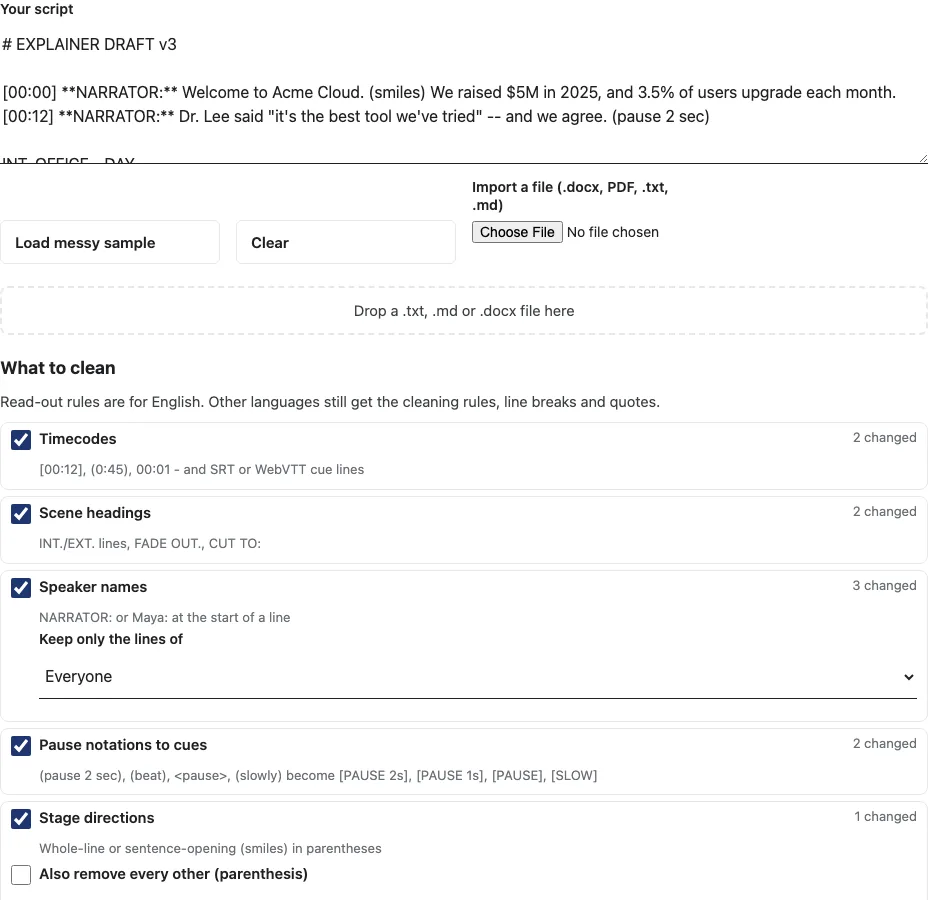
How to use the script formatter
- Paste your script into the box, or use the file button to pick a .txt, .md or .docx file. You can also drop a file onto the box.
- Look at the rule switches. Timecodes, Scene headings, Speaker names, Pause notations to cues, Stage directions, Markdown and the others each have their own switch and show how many places they changed. Turn off any rule you do not want.
- Choose Lines: One sentence per line (the default), One phrase per line, or Keep my line breaks.
- If several people speak, use Keep only the lines of to keep one voice and drop the others.
- Set Longest line (characters) if you want a limit, Pause after each paragraph (seconds) if you want a pause cue after every paragraph, and Add {#marker} to every heading for jump targets.
- Open What changed. Red struck-through text was removed, green text was added or moved, and ↵ marks a new line break. Check the number read-outs here, because they are the rules most likely to guess wrong.
- Switch to Clean text, then press Copy clean text, Download .txt or Send to teleprompter.
Switch settings are kept in the page address. The script is not, so a shared link carries your settings and none of your text.
How do I format a script for a teleprompter?
Paste the script, let the rules strip timecodes, scene headings, speaker labels and stage directions, set one sentence or phrase per line, and copy the clean text.
| Rule | What it changes |
|---|---|
| Timecodes | [00:12], (0:45), 00:01 -, ranges such as 0:00-0:15, SRT cue numbers and arrow lines, the WEBVTT line |
| Scene headings | INT. OFFICE - DAY, EXT. PARK, FADE OUT., CUT TO:, THE END, (CONT’D) |
| Speaker names | NARRATOR:, NARRATOR:, Host:, Speaker 2:, Maya: at the start of a line |
| Stage directions | A line that is only (smiles), a leading (smiling), a (laughs) at the start of a sentence |
| Markdown | Bold, italics, links (the link text stays), list markers, quotes, table pipes, code fences |
A time inside a sentence such as “Meet at 10:30 am” is left alone, and so is a timecode followed by a single space. A label counts as a speaker when it is in capitals, a role word such as host or narrator, or a name that labels two or more lines, so “Note: bring water” stays. Headings stay as # Heading section titles, which are not read aloud; the Headings list can remove them.
How do I add pauses to a script?
Write the pause in the script in any common way, such as (pause), (pause 2 sec), (beat) or
| You write | Cue in the clean text |
|---|---|
| (pause) | [PAUSE] |
| (pause 2 sec) | [PAUSE 2s] |
| (beat) | [PAUSE 1s] |
| (short pause) | [PAUSE 0.5s] |
| (long pause) | [PAUSE 3s] |
| [PAUSE] | |
| [pause 3] | [PAUSE 3s] |
| (slowly) | [SLOW] |
Only notes of up to three words are converted, so “(slow growth in Q3)” stays. A plain [PAUSE] takes 1.5 seconds in the timing tools. Add {#marker} to every heading adds a jump target such as {#why-it-matters}.
What does the read-out of numbers do?
It writes numbers, money and abbreviations the way a speaker says them, so you do not stumble on “$4.2B” in front of a camera. It works for English only and follows US usage. URLs and e-mail addresses are never touched.
| Switch | You write | Clean text |
|---|---|---|
| Money, percent, units (on) | $5M | five million dollars |
| $1,250 | one thousand two hundred fifty dollars | |
| $3.50 | three dollars fifty | |
| $29/mo | twenty-nine dollars a month | |
| 3.5% | three point five percent | |
| Times, years, ordinals (on) | 10:30 AM | ten thirty A M |
| in 2026 | in twenty twenty-six | |
| 1905 after “in” | nineteen oh five | |
| All other numbers (off) | 15 | fifteen |
| Abbreviations (on) | Dr. Lee | Doctor Lee |
| e.g. | for example, | |
| No. 5, #1 | number five, number one |
A four-digit number counts as a year only after a word such as in, since, by, from, until, during, before, after or a month name, so “we had 2026 users” stays. A bare number plus M or k is read as million or thousand, so check the diff. Dates such as 2026-10-25, phone numbers and ranges are left alone even when All other numbers is on.
Worked example: a messy script, cleaned
The Load messy sample button loads this text. It has a Markdown title, timecodes, bold speaker labels, a stage direction, two pause notes, a scene heading, a bullet list and several numbers:
# EXPLAINER DRAFT v3

[00:00] **NARRATOR:** Welcome to Acme Cloud. (smiles) We raised $5M in 2025, and 3.5% of users upgrade each month.
[00:12] **NARRATOR:** Dr. Lee said "it's the best tool we've tried" -- and we agree. (pause 2 sec)

INT. OFFICE - DAY

MAYA: Our plan starts at $29/mo, e.g. the 1st tier includes 10GB. (beat) Questions?
With the default rules it changes 2 timecodes, 2 scene headings, 3 speaker labels, 1 direction, 2 cues, 5 quotes or dashes, 6 numbers and 2 abbreviations. The clean text (bullet list and FADE OUT. left out here) is:
# EXPLAINER DRAFT v3

Welcome to Acme Cloud.
We raised five million dollars in twenty twenty-five, and three point five percent of users upgrade each month.
Doctor Lee said “it’s the best tool we’ve tried” — and we agree. [PAUSE 2s]

Our plan starts at twenty-nine dollars a month, for example, the first tier includes ten gigabytes. [PAUSE 1s]
Questions?
Set Longest line (characters) to 40 with One phrase per line and long sentences break at commas first, then between words; a cue is never split.
How this tool works and where the numbers come from
The rules run in a fixed order: whitespace, timecodes, scene headings, speaker labels, pause notations, stage directions, Markdown, quotes, read-out of numbers, line breaks, pauses and markers. Cues and URLs are protected while the text rules run. Pause words come from the cue table of the Prompterline teleprompter core (27 languages) and the output is parsed back with the same core in the page tests. The read-out rules are English only and follow US usage (no ‘and’ in 1,250).
Sources
Questions, briefly answered
How can I convert text to script format?
Paste plain text into the box or import a file, and the rules convert it. Each rule has a switch and a counter, so you can see what it changed before you copy. The output is plain text for reading aloud, with cues in Prompterline syntax, not a screenplay layout.
What file formats can I import?
.txt, .md and .docx, picked with the file button or dropped onto the box. Text files may be UTF-8, UTF-16 or Windows-1252. PDF and the old .doc format are not supported. The only exports are Copy clean text and Download .txt: plain text, with no PDF or Word file.
Can I import a Word document?
Yes. A .docx file is read in your browser. Headings come from Word heading styles, tracked deletions and comments are skipped, and tables become paragraphs. Save an old .doc file as .docx first.
How do I format a script for a video?
Paste the script, remove timecodes, speaker labels and scene headings, split it into one phrase per line and set a short line length. Check the diff, then send it to the teleprompter. It takes seconds.
Can I edit the script after formatting?
Edit the text in the script box and the clean text updates. The clean text view is read-only: copy it into any editor to change it by hand. Formatting the output again changes nothing, except that it adds pauses again if you ask for them.
Is my script kept private?
The script is processed in your browser and is not uploaded. Send to teleprompter keeps the text in this browser’s local storage until the teleprompter opens it, and it never goes into an address.
What line length is best for a teleprompter?
It depends on the screen and the font, so there is no single number here. Leave Longest line (characters) at 0 for no limit, or set one and long sentences break at commas, semicolons, colons and dashes first, then between words, so the lines come out balanced.
Is screenplay format the same as script format?
Screenplay format is one specific script layout, for film and television. Formatters that rank for this search produce it in 12-point Courier with scene headings and character cues. This tool does the reverse: it strips that scaffolding so the words can be read aloud, and a screenplay layout needs screenwriting software. A screenplay has a title page and scene headings; a script you read aloud needs neither, so this tool leaves them out.
Related tools
- Script Timer: time the cleaned script section by section.
- Teleprompter Speed and Font Size: set a scroll speed and font size.
- Video Script Builder: draft a script from a video length.
- Mirror Text: flip text for a glass teleprompter.
- Speaking Speed Test: measure your words per minute.
- Read a Script Naturally: mark a script so it sounds like speech.