
Script Timer
A script timer estimates how long a script takes to read aloud. Paste a script to see its reading time by section, with cues such as [PAUSE 2s] counted as seconds. The estimate is only as accurate as the pace you give it, and the timed read-along checks it against your own voice.
Free · runs in your browser · nothing is uploaded
This script timer reads your script the way a speaker does. Headings split it into sections, bracketed cues such as [PAUSE 2s] add their seconds, every paragraph gets a short breath gap, and the pace comes from the language you pick. You see the total, a table with the time and the start of each section, and how far you are from a target time. A timed read-along then runs a stopwatch beside the script, so you can check the estimate against your own voice instead of trusting a fixed pace. Both the table and the read-along marks can be copied or downloaded as CSV for a producer, a client or your own notes. It is a speaking time calculator and speech timer.
Paste your script into the tool on this page, then check the estimate with the speaking speed test or the timed read-along.
At a glance
A script timer estimates how long a script takes to read aloud. It counts the spoken words, divides by a speaking pace in words per minute and adds the time of pauses.
- At the standard English pace of 150 words per minute, 500 words take 3 minutes 20 seconds before pauses.
- A cue such as [PAUSE 2s] adds 2 seconds, and a plain [PAUSE] adds 1.5 seconds.
- Each paragraph gets a short breath gap of 0.4 seconds by default.
- The presets for English are 110, 130, 150 and 170 words per minute.
- Japanese, Chinese, Korean and Thai are counted in characters rather than words.
- A positive difference on the read-along stopwatch means you are behind the plan.
Last checked:
How to time a script
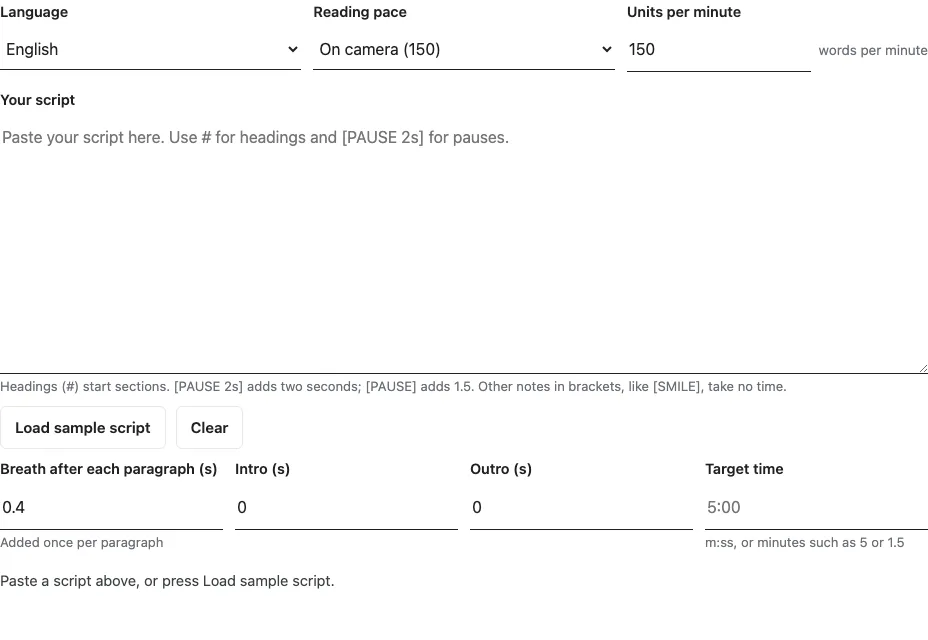
- Paste the script into the box, or press Load sample script to see the format.
- Choose the Language. The pace, counted in words or characters per minute, follows it.
- Pick a Reading pace: Slow, Presentation, On camera or Fast, or type your own number. My saved pace appears after you save one from the speaking speed test or the read-along.
- Mark pauses in the script with
[PAUSE](1.5 seconds) or[PAUSE 3s]. Use#or##for headings if you want a table by section. - Add Intro and Outro seconds for a title card or a sign-off, and a Target time such as
5:00if you have a slot. - Read the total, the split into speaking, pauses and breath, and the verdict against the target.
- Press Copy table to paste the sections into a spreadsheet, or Download CSV.
- To check the estimate by ear, scroll to the timed read-along, press Start, read aloud and tap each paragraph when you reach it. The line under the stopwatch tells you whether you are ahead or behind and where you will finish.
The settings (language, pace, breath gap, intro, outro and target) are kept in the page address, so you can bookmark them. The script itself is never put in the address.
How long is a script of 500 or 1,000 words?
At the standard English pace of 150 words per minute, 500 words take 3 minutes 20 seconds and 1,000 words take 6 minutes 40 seconds, before pauses. A 75-word script fills 30 seconds and a 150-word script one minute. Every [PAUSE 2s] adds 2 seconds on top, so a script with ten of them runs 20 seconds longer than its word count suggests.
Worked example: the sample script
The sample has 90 spoken words, 3 pause cues and 5 paragraphs. At 150 words per minute the speaking time is 36.0 seconds (90 / 150 x 60). The cues add 6.5 seconds: [PAUSE 2s] is 2, [PAUSE] is the default 1.5 and [PAUSE 3s] is 3. The five paragraph gaps at 0.4 seconds add 2.0. The total is 44.5 seconds, shown as 0:45 in the table, and the section “What we built” starts at 0:12.
How does the timed read-along work?
The read-along turns the plan into a clock. Each paragraph has a planned start time, calculated from the words and pauses before it. When you press Start, a stopwatch runs and the paragraph the plan expects you to be reading is highlighted. When you reach a paragraph, tap it or press N. The page subtracts its planned start from the stopwatch: a positive difference means you are behind, a negative one means you are ahead.
After a mark it also projects the finish twice. The first projection assumes the rest goes as planned. The second assumes you keep the pace you have shown so far, and appears once at least 10 seconds of planned reading are behind you. If you set a target, the projection is compared with it. Once you have read at least 25 words and 15 seconds of speaking before your last mark, a button offers to save the pace you actually read at as My saved pace: the page counts the words before that mark and divides by the time without the planned pauses, breath gaps and intro. Marks need a paragraph to be reached, so scripts with long paragraphs give coarser readings; split them with blank lines.
What pace should I use for a script?
Published English ranges differ because they measure different things. Debatrix gives 110 words per minute for a slow speaker, 140 for an average one and 170 for a fast one. VirtualSpeech lists 100 to 150 words per minute as a comfortable pace for presentations, 120 to 150 for conversation and 150 to 160 for audiobooks, radio hosts and podcasters. A 2019 meta-analysis of 77 studies by Brysbaert found an average oral reading rate of 183 words per minute in English.
The presets use 110, 130, 150 and 170 for English. They are starting points. People read a prepared script at a different speed than they speak freely, so measure yourself with the speaking speed test or the read-along and use My saved pace.
Which pace does each language start with?
Words differ in length between languages, so words per minute cannot be compared across them. Japanese, Chinese, Korean and Thai are counted in characters. The table shows the Prompterline standard pace used when you pick a language. These are rounded starting values, not measured norms; VirtualSpeech’s 2026 data on practice presentations, for example, show English at a median of 110 words per minute and Spanish at 120, which is lower than a prepared read.
| Language | Standard pace per minute |
|---|---|
| English | 150 words |
| Español | 160 words |
| Français | 155 words |
| Deutsch | 135 words |
| Italiano | 155 words |
| Nederlands | 145 words |
| Português (Brasil) | 155 words |
| Svenska | 145 words |
| Dansk | 145 words |
| Norsk bokmål | 145 words |
| 日本語 | 300 characters |
| 한국어 | 330 characters |
| 繁體中文 | 240 characters |
| 简体中文 | 240 characters |
| العربية | 125 words |
| עברית | 135 words |
| Türkçe | 135 words |
| Polski | 130 words |
| Magyar | 125 words |
| Română | 145 words |
| Ελληνικά | 140 words |
| Українська | 140 words |
| Русский | 130 words |
| हिन्दी | 140 words |
| Bahasa Indonesia | 140 words |
| ไทย | 600 characters |
| Tiếng Việt | 170 words |
How do I time a script for a video?
Write to the video length first: at 150 words per minute, a 60-second video holds about 150 spoken words and a 30-second video about 75. Then add the seconds that are not speech: a title card in Intro, a call to action in Outro, and [PAUSE] cues where the picture carries the message. Set the Target time to the video length and read the verdict: it shows how many seconds you are over or under and the pace that would fit exactly. If that pace is far above your own, cut words instead of speaking faster.
How this tool works and where the numbers come from
Reading time = spoken units / pace x 60, plus the seconds of each pause cue, plus a short breath gap after each paragraph (0.4 s by default), plus intro and outro seconds you enter. Spoken units are words, or characters for Japanese, Chinese, Korean and Thai; headings and bracketed notes are not counted. The standard pace is the Prompterline starting value for the language (150 words per minute in English); presets are 11/15, 13/15, 1 and 17/15 of it. The starting values are not measured norms: use the speaking speed test or the read-along to replace them with your own.
Sources
- Debatrix, Speech calculator (English: slow 110, average 140, fast 170 words per minute), read 2026-10-25
- VirtualSpeech, Average Speaking Rate and Words per Minute (data), read 2026-10-25
- Brysbaert (2019), How many words do we read per minute? A review and meta-analysis of reading rate (oral reading 183 wpm)
Questions, briefly answered
What is a script timer, or speaking time calculator?
A script timer estimates how long a script takes to read aloud. It counts the spoken words, divides by a speaking pace in words per minute and adds the time of pauses.
How do I convert text to speech time?
Paste it into the box and read the total at the top. For a check against your own voice, run the timed read-along and compare the stopwatch with the plan. By hand, divide the words by your words per minute: 700 words at 140 take 5 minutes.
Does the script timer count pauses?
Yes. A cue such as [PAUSE 2s] adds 2 seconds and a plain [PAUSE] adds 1.5. Cue words in the other app languages, such as [PAUSA 3s] or [停顿 2秒], work too. Notes like [SMILE] or [LOOK UP] take no time.
How many words is a one-minute video script?
About 150 words at the standard English pace of 150 words per minute, or 130 words at the Presentation pace of 130. Add or remove words after you test the real time with the read-along.
How accurate is the estimate?
It is as accurate as the pace you give it. A fixed pace cannot know how fast you read a given sentence, so treat the first result as a plan and calibrate: the read-along measures your own pace, and My saved pace reuses it.
Can I set a target time?
Yes. Enter it as minutes (5), m:ss (4:30) or seconds (90s). The page shows the difference in minutes and seconds and the pace that would land exactly on the target.
Can I time a script in another language?
Yes. Choose the language and the pace and the unit change: words per minute for most languages, characters per minute for Japanese, Chinese, Korean and Thai.
How do I add an intro and outro to the time?
Enter their length in seconds in the Intro and Outro boxes. They are added to the total and shift the start of every section.
Related tools
- Speech length calculator: fit a script into a slot with slides, Q&A and a safety margin.
- How many words is a 5-minute speech: words for any length from 1 to 60 minutes.
- Speaking speed test: measure your own pace and save it for the timer.
- Teleprompter speed: turn your pace into a scroll speed and font size.
- Script Formatter: clean a script so it reads well on a teleprompter.
- Script timing tools: the whole group in one place.