
Teleprompter App
Prompterline is a teleprompter app that runs in your browser on iPhone, iPad, Android and laptops. Added to your home screen, it opens in its own window with no store download needed. The free plan covers 5 completed prompting sessions per month.
Free · runs in your browser · nothing is uploaded
Added to your home screen, this web page behaves like a teleprompter app: it opens in its own window without the browser bar, keeps the screen awake while the text plays where the browser allows it, and after a couple of visits it starts without a connection. On a phone the text is large and the margins narrow; on a tablet it is larger still. Tap the text to start or pause, drag it to go back, and use the mirror switch when the phone sits under teleprompter glass. It runs on iPhone, iPad, Android phones, Chromebooks and computers alike, so one setup covers every device you own. No store download needed.
The free plan includes 5 completed prompting sessions per month, with or without recording. Pro includes unlimited sessions.
Open the teleprompter, paste your script, and follow the home screen steps above to add it to your device.
At a glance
The Prompterline teleprompter app is a web page that runs in the browser on phones, tablets and computers. Added to the home screen, it opens in its own window without the browser bar.
- The free plan includes 5 completed prompting sessions per month, with or without recording.
- The phone layout is used when the shorter side of the browser window is below 600 px.
- Offline use requires the page to be opened twice with a connection.
- Follow my voice runs only in desktop Chrome 139 and later.
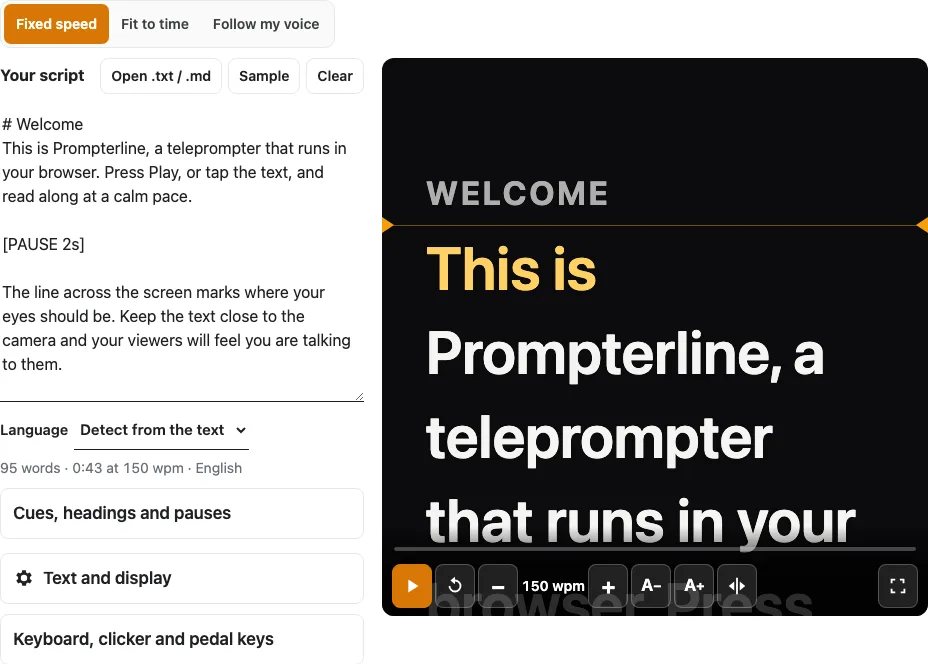
- Text in square brackets is shown but not read, and [PAUSE 2s] stops the text for two seconds.
Last checked:
How to add the teleprompter to your home screen
- Open this page once with a connection, then reload it once. The first visit installs the site’s offline helper and the second stores the page, so it opens later without a network.
- iPhone or iPad (Safari): tap the Share button, then Add to Home Screen, then Add.
- Android (Chrome): open the menu (three dots) and choose Install app or Add to Home screen. Some phones also show an Install app button at the bottom of the page.
- Windows, Mac or Chromebook (Chrome or Edge): click the install icon at the right end of the address bar, or Install app at the bottom of the page when the browser offers it.
- Open Prompterline from the new icon. Paste your script, tap the full-screen button, then tap the text to start.
- While it plays, drag the text to move back, use − and + for speed and A− and A+ for size. The controls fade after 2.5 seconds and come back when you tap.
- To remove it later, press and hold the icon and choose the remove or uninstall option; your saved script goes with the site’s data.
The installed app and the browser page share the saved script: a script you pasted on the home page is waiting here too, as long as it is the same browser on the same device. Phone and tablet layouts each remember their own text size, margins and colours.
Web app or store app: what each can do
A web teleprompter you add to the home screen covers the reading itself: speed in words per minute, fitting a script to a set length, pause cues, mirror and flip, on every device with one saved script and no account. Store apps add things a web page cannot do, mostly recording and hardware control.
| Feature | This web app | Typical store app |
|---|---|---|
| Install | Add to Home Screen, no store, no account | App Store or Google Play |
| Devices | iPhone, iPad, Android, Mac, Windows, ChromeOS, Linux | one platform per app |
| Speed in words per minute, Fit to time | yes | varies |
[PAUSE 2s] cues stop the text | yes | rare |
| Mirror and upside-down flip | yes | yes |
| Works offline | after two visits online | yes |
| Follow my voice | desktop Chrome 139+ only, on the device | usually phones too |
| Records video | no | often |
| Remote control from a second phone | not yet | often |
| Hidden from screen sharing | no | some Mac apps |
Can I use my phone as a teleprompter?
Yes. Put the phone directly above or below the camera lens, open this page, tap full screen and tap the text to start; the camera, another phone or a computer records you. Under teleprompter glass, turn on mirror so the reflection reads the right way round.
- Mount the phone close to the lens, in portrait for short lines or landscape for more words per line.
- Set the speed in words per minute, or choose Fit to time and type the planned length.
- Tap full screen, then tap the text. On iPhone the prompter fills the browser window, because Safari offers element full screen only on iPad.
For a selfie video on the same phone, a camera app cannot record behind a full-screen web page on most phones, so a store app with built-in recording is the better fit there.
Does it work without an internet connection?
Yes, once the page has been opened twice with a connection: the first visit installs the offline helper and the second stores the page and its scripts. After that it opens and scrolls offline. A page opened only once is not yet available offline.
How does voice-activated scrolling work?
Follow my voice compares what you say with the script and moves the text to the words you are speaking: it waits when you stop and catches up when you skip ahead. It runs only where the browser recognises speech on the device, currently desktop Chrome 139 and later; phones use Fixed speed or Fit to time.
Can I add stage directions or notes I don’t want to read out loud?
Yes. Anything in square brackets is shown but not read, and [PAUSE 2s] stops the text for two seconds. A line starting with # becomes a small heading, and lines starting with // are hidden.
How this tool works and where the numbers come from
Behaviour described on this page was checked in the shipped code and in headless Chromium on 2026-10-25: phone layout below 600 px, CSS full window when the Fullscreen API is missing (iPhone), tap and drag, wake lock request, and offline loading through the site’s service worker (network first for pages, cache first for versioned scripts and styles). Real-device behaviour on iPhone and Android was not tested.
Sources
- MDN, Making PWAs installable (manifest, service worker, install prompts), read 2026-10-25
- MDN, Element.requestFullscreen() browser compatibility (Safari: only on iPad, not on iPhone), read 2026-10-25
- MDN, Screen Wake Lock API, read 2026-10-25
- MDN, SpeechRecognition.available() (on-device speech in desktop Chrome 139+), read 2026-10-25
Questions, briefly answered
What is the best free teleprompter app?
The best one is the one that fits your setup. If you record with a separate camera or on a computer, a browser teleprompter like this one does the job without an install or account. If you need recording, a phone remote or external display output in the same app, compare store apps on those features and their subscription prices. On iPhone and Android, open this page in Safari or Chrome and add it to the home screen.
Does the iPhone have a built-in teleprompter?
No, iOS does not come with a teleprompter app. You can install one from the App Store, or open this page in Safari and add it to the home screen. On iPhone it fills the browser window rather than using true full screen.
Is the teleprompter app legit?
Check what an app does with your script before you paste it. This one runs in your browser, has no account, keeps the script and settings in this browser only and never uploads them; clearing the site’s data deletes them.
Does it work on Android or Windows?
Yes, in Chrome, Edge, Firefox and other current browsers on Android, Windows, macOS, ChromeOS and Linux. Chrome and Edge can install it as an app. It is also free teleprompter software for a PC: open it in Chrome, Edge or Firefox.
How many languages does it support?
Scripts can be written in 27 languages; the page detects the language from the letters or you pick it. Arabic and Hebrew run right to left, Japanese and Chinese can run in vertical columns, and the controls are in English for now.
Can I jump to a specific part of my script?
Yes. Drag the text, tap the progress bar, or press Page Up, Page Down, Home or End on a keyboard or clicker.
Can I use a teleprompter app with an external camera?
Yes. Put the phone or tablet running the prompter next to the camera lens, or under beam-splitter glass with mirror on, and record with the camera itself.
Does the teleprompter stay invisible during screen sharing?
No. Zoom or Meet can capture a browser window, including the floating prompter window, when you share the whole screen. Share a single window or tab instead.
Related tools
- Online teleprompter: the full prompter with the script box beside it.
- Speaking speed test: find the words per minute to set.
- Teleprompter speed: scroll speed and font size for your screen and reading distance.
- Script timer: reading time of a script by section.
- Speech length calculator: words to minutes.
- Mirror text: mirrored text for teleprompter glass.