
Teleprompter for iPad
Yes, you can use a teleprompter for iPad in Safari, with no App Store download. Paste your script, tap the text to play or pause, and record with a camera or another device. The page cannot record video, and iPad Safari has no floating window or voice following.
Free · runs in your browser · nothing is uploaded
Yes, you can use an iPad as a teleprompter: open this page in Safari, paste your script, and the text scrolls past a reading line while you record with a camera or another device. The iPad needs no App Store download, and Add to Home Screen gives the page its own icon. It starts with iPad settings (text size 60 px, side margins 8 %, reading line 30 % from the top). Two panels sit under the prompter: a check of what your iPad’s Safari supports, and a box that shows which key your Bluetooth pedal or presentation clicker sends and what the prompter does with it. A free iPad teleprompter and autocue app that runs in Safari.
Open the teleprompter in Safari and use the Test your clicker or pedal box to check your keys before you record.
At a glance
A teleprompter for iPad is a web page that runs in Safari on iPad. It scrolls your script past a reading line while you record with a camera or another device.
- Full screen works on iPad Safari from iOS/iPadOS 16.4, but iPhone Safari does not offer it.
- The screen stays awake from iOS/iPadOS 18.4; from 16.4 to 18.3 it works in a browser tab but not in Home Screen web apps.
- The iPad settings start with a text size of 60 px, side margins of 8 %, and a reading line 30 % from the top.
- The free plan includes 5 completed prompting sessions per month.
- The page does not record video or audio, and iPad Safari has no floating window or voice following.
Last checked:
How to use the teleprompter on an iPad
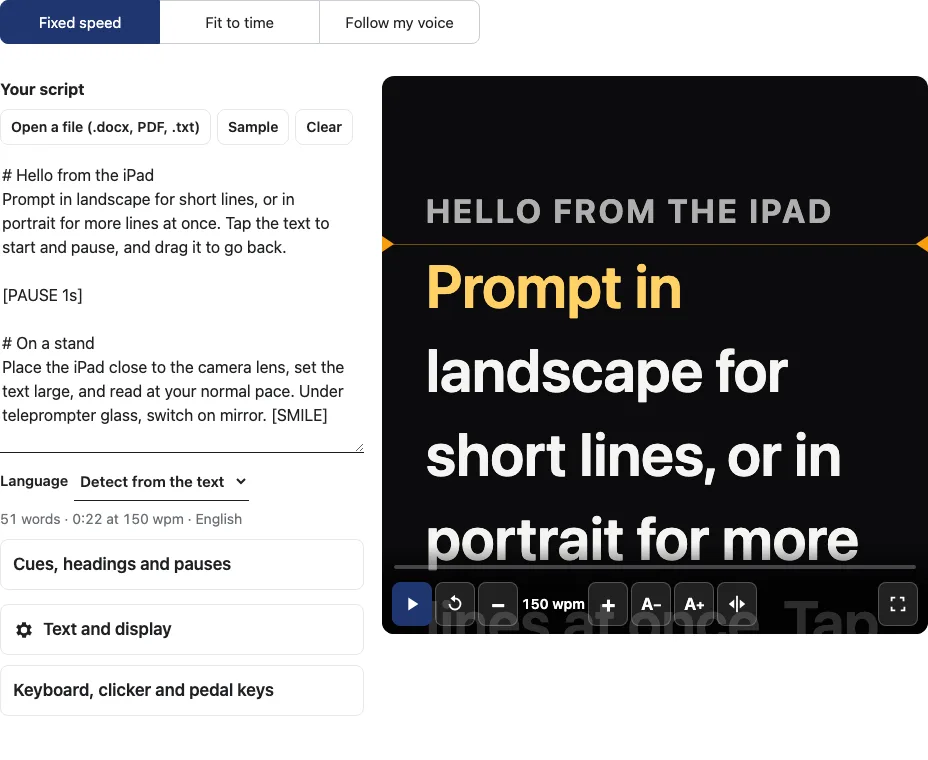
- Open this page in Safari. For an app-like icon, tap Share, then Add to Home Screen, then Add. Open it once more online so it is stored for offline use.
- Paste your script into Your script, or open a
.txtor.mdfile with Open .txt / .md. - Set the pace with − and + (words per minute, English starts at 150), or choose Fit to time and type the length as m:ss.
- Set the text size with A− and A+, or open Text and display for margins, colours and the reading line.
- Under teleprompter glass, switch on mirror (button, or the M key). Flip (the U key) is for an upside-down mount.
- Press the full-screen button, then tap the text to play or pause and drag it to go back. Turn the iPad to landscape or portrait; the text reflows to the new width.
- With a pedal or clicker, open the Test your clicker or pedal box first and check that its keys are recognised.
- Put the iPad close to the camera lens, then record a short test take. Check that the text is readable from your seat and that the reading line sits where your eyes land, and adjust the size or the reading line position before the real take.
Can I use a teleprompter on my iPad?
Yes. This page runs in Safari on iPad and can fill the screen, but a few features depend on your iPadOS version and on what Safari allows. The browser check panel under the prompter tells you which features your iPad can use.
| Feature | iPad Safari | What to know |
|---|---|---|
| Full screen | Yes, from iOS/iPadOS 16.4 | Safari shows an overlay button and swiping down exits. If full screen is refused, the prompter uses a full-window layout instead. iPhone Safari does not offer it. |
| Screen stays awake | Yes, from iOS/iPadOS 18.4 | From 16.4 to 18.3 it works in a browser tab but not in Home Screen web apps. |
| Floating window | No | Document Picture-in-Picture does not exist on iPad Safari. |
| Follow my voice | No | It needs on-device speech recognition, which Safari does not offer. |
Because the floating window and voice following are missing on iPad, you control the pace yourself with speed settings, Fit to time, or a pedal.
How do I mount an iPad under the lens or under glass?
Put the iPad as close to the lens as the mount allows and raise the text size until you can read it without leaning in. Under beam-splitter glass the reflection is reversed, so switch on mirror; for a rig that holds the iPad upside down, switch on flip. Both switches are in Text and display and on the M and U keys, and the page saves them for the next visit.
The page cannot record, so the camera, or another phone, does the filming. The iPad camera app cannot record behind a full-screen web page.
What do a pedal or clicker send to the prompter?
A Bluetooth page-turner pedal or presentation clicker that pairs as a keyboard sends ordinary key presses, and the prompter maps these keys while the page has focus:
| Key | Prompter action |
|---|---|
| Space, K, B or . | play or pause |
| Page Down or Down | next line |
| Page Up or Up | previous line |
| Right or Left | faster or slower |
| Home or End | start or end of the script |
Open the test box on the page, tap it, and press each pedal button: it shows the key received and the action, or says the key is ignored. We have not tested a specific pedal model on a real iPad.
Does it work in landscape and portrait?
Yes. The text area resizes with the screen, so the text reflows when you rotate the iPad. Landscape suits short lines of large text, while portrait fits more lines on screen at once. If you mount the iPad under beam-splitter glass, turn on the mirror switch (M). For upside-down mounting, use the flip switch (U).
How this tool works and where the numbers come from
Feature rows come from MDN browser compatibility data v8.1.7 (read 2026-10-25) and from feature detection in your own browser on this page. The prompter was checked in headless Chromium at tablet sizes; a real iPad and a real pedal were not tested. The key tester lists the keys the prompter maps (Space, K, B, full stop, arrows, Page Up, Page Down, Home, End, M, U, F, H, plus, minus, Esc).
Sources
- MDN, Element.requestFullscreen() browser compatibility (Safari: only on iPad, not on iPhone), read 2026-10-25
- MDN, Screen Wake Lock API and browser compatibility data (Chrome 84, Firefox 126, Safari 16.4; iOS 18.4 for Home Screen apps), read 2026-10-25
- MDN, Document Picture-in-Picture API and browser compatibility data v8.1.7 (Chrome and Edge 116, Firefox 151, no Safari, no mobile), read 2026-10-25
- MDN, Making PWAs installable (Add to Home Screen), read 2026-10-25
Questions, briefly answered
Is there a completely free teleprompter app?
The free plan includes 5 completed prompting sessions per month, with or without recording. Pro includes unlimited sessions. It opens in Safari on iPad, and your script and settings stay in this browser.
Does the iPhone have a built-in teleprompter?
Not in the Camera app. You can install a prompter app from the App Store or open this page in Safari. Element full screen works on iPad but not on iPhone, where the prompter fills the browser window instead; see the phone page.
Can I use a teleprompter app with an external camera?
Yes. The page cannot record, so you point an external camera at yourself and keep the iPad beside the lens to show the text. Use the mirror switch if the iPad sits under beam-splitter glass.
Can I use a Bluetooth page-turner pedal?
Probably, because pedals that pair as a Bluetooth keyboard send keys such as Page Down, Page Up, or Space, and the prompter maps those to next line, previous line, and play/pause. The key tester box on the page shows exactly what your pedal sends. We have not tested a specific pedal model on a real iPad, so check the key tester first.
How do I add it to the Home Screen?
Open the page in Safari, tap the Share button, then tap Add to Home Screen and Add. The tool then opens in its own window from your Home Screen. After two visits online, it also opens without a connection.
Does the teleprompter record video?
No. The page does not record video or audio. Use an external camera or another device to film while the iPad shows your script.
What is the best teleprompter app for iPad?
For reading next to a camera, a browser teleprompter is enough: speed in words per minute, a mirror switch for glass and a pedal test. If you need recording or a remote in one app, compare store apps and their prices.
Can I use an iPad as a teleprompter with glass?
Yes. Turn on the mirror switch, put the iPad face up under the glass and read the reflection.
Related tools
- Online teleprompter: the full prompter with every control on one page.
- Teleprompter for phone: one-hand controls and wake lock on iPhone and Android.
- Teleprompter app: web app or store app: what each can do.
- Teleprompter for YouTube: recording a video with a separate camera.
- Teleprompter speed: scroll speed and font size for your screen and reading distance.
- Speaking speed test: measure your words per minute before you set the pace.
- Mirror text: mirrored text for teleprompter glass.