
Teleprompter for Mac
A teleprompter for Mac runs in your browser on macOS, with nothing to download. Paste your script and press Play. The page shows which features your browser supports, checks the camera-to-text angle on a MacBook, and can send the prompter to an external display. The free plan includes 5 completed prompting sessions per month, and real Mac hardware was not tested for this page.
Free · runs in your browser · nothing is uploaded
Yes, a Mac can run this teleprompter: open the page in Safari, Chrome, Edge or Firefox on macOS, paste your script and press Play, with nothing to download. The page starts with settings for a MacBook (reading line 18 % from the top, side margins 18 %, text size 40 px) and puts three tools under the prompter: a live check of what your browser supports, an eye-line calculator for the MacBook Air and Pro screen sizes, and a key tester for presentation clickers and keyboards. Real Mac hardware and external displays were not tested for this page; the checks ran in headless Chromium, so test your own setup before an important recording.
The free plan includes 5 completed prompting sessions per month, with or without recording. Pro includes unlimited sessions.
Paste your script into the prompter, press Play, and record a short test take.
At a glance
A teleprompter for Mac is a prompter that runs in Safari, Chrome, Edge or Firefox on macOS, so there is nothing to download or install.
- The free plan includes 5 completed prompting sessions per month, with or without recording.
- The browser table lists the floating window for Chrome and Edge as Version 116 and later.
- The eye-line calculator starts with a camera-to-picture gap of 0.4 cm.
- Real Mac hardware and external displays were not tested for this page; the checks ran in headless Chromium.
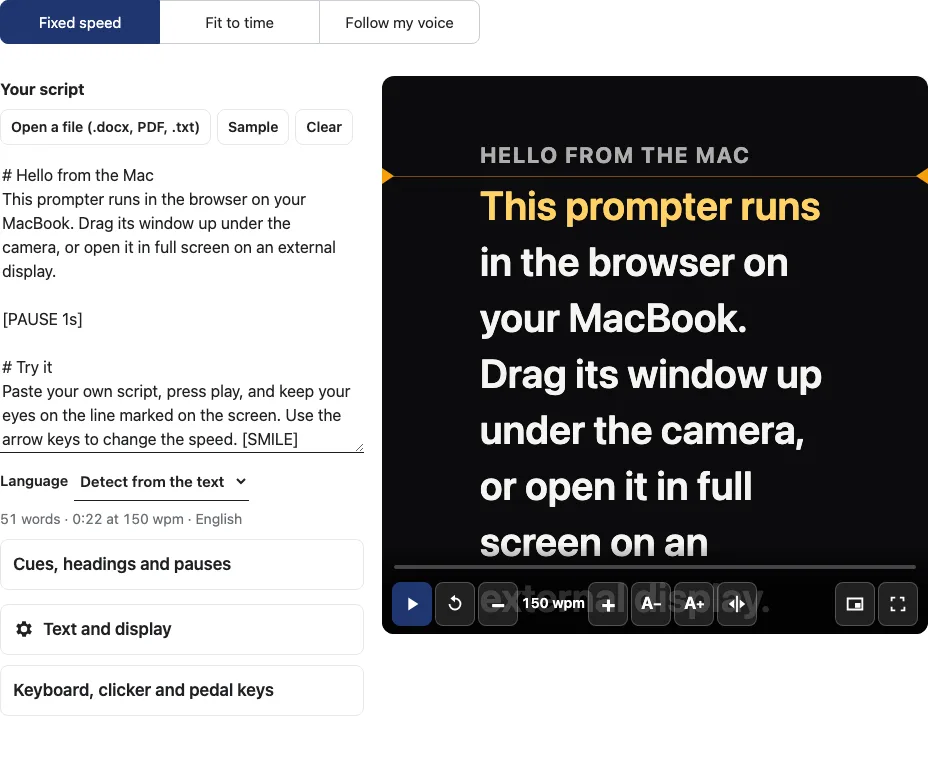
How to use the teleprompter on a Mac
- Open this page in Safari, Chrome, Edge or Firefox. The panel What your browser can do here shows what yours supports.
- Paste your script into Your script. Brackets such as
[PAUSE 2s]are shown but never read. - Set the pace with − and + (words per minute, English starts at 150), or choose Fit to time and type the length as m:ss.
- For the built-in camera, open the Eye line panel, choose your MacBook, enter your distance and the window height, and press Set reading line to … % (≤ 2°). Drag the browser window to the top edge of the screen.
- For an external display or glass, drag the window to that display and press F or the full-screen button. Press M to mirror the text for beam-splitter glass.
- Press Play, click the text, or press Space. Click the prompter first so it has keyboard focus.
- If you use a clicker, open Test your clicker or pedal under the prompter, press each button, and check that the action shown is the one you want.
- Record a short test take and check where your eyes go. If the text pulls them away from the lens, press the 2° button again or make the window shorter.
Which browser should I use on a Mac?
Chrome gives you the most options on a Mac. It can float the prompter in its own window, install it as an app and run Follow my voice from version 139. Edge can float and install too, but does not offer voice following in its released versions. Safari has no floating window; Firefox has a floating window from version 151 but no voice following.
| Browser on macOS | Floating window | Keep screen awake | Follow my voice |
|---|---|---|---|
| Chrome | Version 116 and later | Version 84 and later | Desktop, version 139 and later |
| Edge | Version 116 and later | Version 84 and later | Not available |
| Firefox | Version 151 and later | Version 126 and later | Not available |
| Safari | Not available | Version 16.4 and later | Not available |
Full screen works in all four browsers (Safari from 16.4; older versions used a prefixed form that the prompter also tries). The version numbers come from MDN browser compatibility data, so update your browser if a feature is missing.
Where is the camera on a MacBook?
The camera sits at the top centre of the screen: in a housing in the display on the MacBook Pro 14 and 16 inch (since 2021) and the MacBook Air (since 2022). Text near the top edge of the screen is therefore as close to the lens as it can be. The eye-line calculator under the prompter starts with a camera-to-picture gap of 0.4 cm; measure yours and enter it.
How do I use an external display or teleprompter glass with a Mac?
Drag the browser window onto the second display, then press F or click the full screen button so the prompter fills that screen. For beam-splitter glass that reflects the text, press M to mirror it. This build has only been checked in headless Chromium, not on real Mac hardware or external displays, so run a test before you record.
- Drag the prompter window onto the external display.
- Press F or use the full screen button.
- For beam-splitter glass, press M to mirror the text. Press U if your rig also needs the text flipped upside down.
- Press H to hide the controls while the text plays.
How this tool works and where the numbers come from
Angle = atan(distance of the reading line below the camera / distance from your eyes to the screen). The reading line sits at camera gap + screen height x (window top + window height x reading line position), all in cm; screen height comes from the diagonal and aspect ratio of the selected screen. The bands use 2 degrees (eye contact is still perceived within 1.2 degrees horizontally and 1.7 degrees vertically in the TU Eindhoven study) and 10 degrees (rated effectiveness of calls drops in the 2022 IEEE Access study); 5 degrees is our own middle step. Behaviour of the floating window, full screen and wake lock was checked in headless Chromium on 2026-10-25 and against MDN browser compatibility data; real devices were not tested.
Sources
- MDN, Document Picture-in-Picture API and browser compatibility data v8.1.7 (Chrome and Edge 116, Firefox 151, no Safari, no mobile), read 2026-10-25
- MDN, Screen Wake Lock API and browser compatibility data (Chrome 84, Firefox 126, Safari 16.4; iOS 18.4 for Home Screen apps), read 2026-10-25
- MDN, Element.requestFullscreen() browser compatibility (Safari: only on iPad, not on iPhone), read 2026-10-25
- Human sensitivity to eye contact in 2D and 3D videoconferencing, TU Eindhoven (maximum offsets of 1.2 degrees horizontally and 1.7 degrees vertically)
- Subjective influence of camera-gaze angular offset, Holub et al., IEEE Access 2022 (10 degrees of misalignment lowers rated effectiveness of business calls)
Questions, briefly answered
Is there a teleprompter app for Mac?
Yes. Prompterline runs in Safari, Chrome, Edge and Firefox on macOS with no download, so you open the page and start. Chrome and Edge can also install it as an app from the browser.
How to do a teleprompter on Mac?
Open the page, paste your script, set a speed, then press Play. Press Space or click the text to pause and resume. The steps above list the controls in order.
Can a teleprompter scroll backward?
Yes. Drag the text with your mouse, press Up or Page Up to go back a line at a time, or click the progress bar to jump to another point in the script. Down and Page Down move you forward again.
Do any Mac teleprompters stay invisible during screen sharing?
Not this one. Prompterline is a normal browser window, so it can appear in a shared screen. To keep it out of view, share a single window or tab instead of your whole screen.
Does Follow my voice work on a Mac?
Only in desktop Chrome 139 and later. Safari, Edge and Firefox do not offer it, and the mode stays off there. When it runs, speech recognition happens on your device and your input is not uploaded to a server.
Where should I put the prompter on a MacBook so I look at the camera?
On a MacBook Pro 14.2 inch, the camera sits at the top centre of the screen. With the default 0.4 cm camera offset and a viewing distance of 60 cm, a window 40 % tall at the top edge puts the starting reading line (18 %) 1.8 cm below the camera, about 1.7 degrees off. Full screen at 18 % is 3.8 cm, or 3.7 degrees. To stay within 2 degrees, keep the reading line at 22 % or less in a window, or 8 % or less in full screen. Measure your own screen, since the calculator defaults to 0.4 cm.
Is there a free autocue app for Mac?
Autocue is the British word for a teleprompter. This page does the same job on a Mac in Safari or Chrome, free, with no download.
Is there a teleprompter for MacBook Air and Pro?
Yes. The page starts with MacBook settings and an eye-line calculator for the MacBook Air and Pro screens.
Related tools
- Online teleprompter: the full prompter with every control on one page.
- Teleprompter for laptop: the same check for Windows and Chromebook laptops.
- Teleprompter for Zoom: a floating prompter window over a video call.
- Teleprompter app: add the prompter to your home screen or dock.
- Teleprompter speed: scroll speed and font size for your screen and reading distance.
- Speaking speed test: measure your words per minute before you set the pace.
- Script timer: reading time of a script by section.