
Teleprompter for YouTube
A teleprompter for YouTube shows your script in large text next to the lens while you record with your own camera. It starts with video settings and adds [CUT] markers based on your pace and shot length. The page does not record or link to YouTube.
Free · runs in your browser · nothing is uploaded
A teleprompter for YouTube videos shows your script in large text next to the lens while you record with your own camera, so you can read to camera without memorising lines. This page starts with video settings: a five-second countdown, narrow lines (side margins 16 %), text size 46 px and a reading line 20 % from the top. It does not record and has no link to YouTube. Under the prompter is a cut-marker tool: enter your pace and shot length and it shows how many words fit in a shot and puts a [CUT] label in your script at those points, so you know where to pause or look up. A teleprompter for creators, free in the browser.
Measure your words per minute with the speaking speed test, then enter that pace in the cut markers panel on this page.
At a glance
A teleprompter for YouTube shows your script in large text next to the lens while you record with your own camera, so you can read to camera without memorising lines.
- The page does not record and has no link to YouTube.
- The prompter has a five-second countdown.
- The page uses narrow lines with side margins of 16 %, text size 46 px and a reading line 20 % from the top.
- At 150 words per minute, which is the English default, a 6-second shot holds 15 words.
- The cut-marker panel places a [CUT] label at the end of the first sentence that reaches the shot length, then restarts the count.
Last checked:
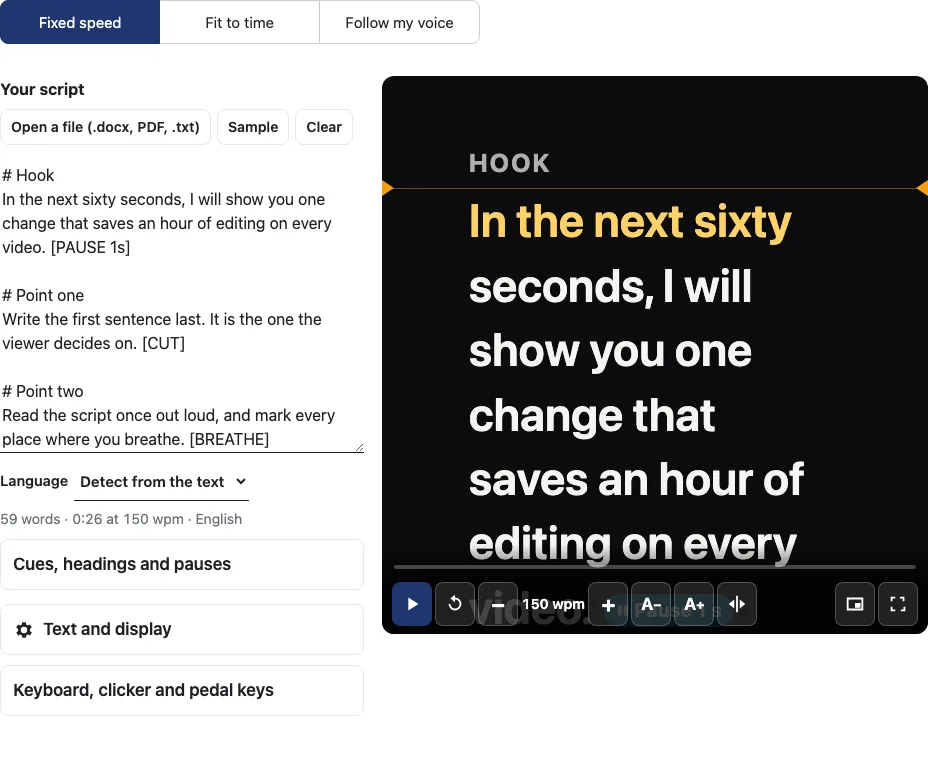
How to use a teleprompter for YouTube videos
- Paste your script into Your script. Use
[LOOK UP]where you want to glance into the lens and[PAUSE 1s]where the text should stop. - Measure your pace with the speaking speed test or leave the English default of 150 words per minute. Set it with − and +, or choose Fit to time and type the length you want as m:ss.
- In Cut markers for your edit, enter your pace and the shot length in seconds, then press Add [CUT] markers to the script.
- Put the device with the prompter directly under or beside the lens, or under beam-splitter glass with mirror on.
- Start recording on your camera or second device first. The page does not record.
- Press Play or Space. The countdown gives you five seconds. Page Down and Page Up move a line; the arrow keys change speed.
- If a line goes wrong, press Page Up to step back to it, or drag the text, and restart the sentence from there. Cutting the take later is easier than starting over.
- After the take, press Home to go back to the start for the next one, and watch the first clip to check where your eyes went.
How fast should I read for a video?
Read at a pace you can keep up without rushing, and measure it before you record. Use the speaking speed test to find your words per minute, then enter that pace and your shot length in the cut markers panel. At 150 words per minute, which is the English default, a 6-second shot holds 15 words. How often to cut is your decision; this page gives you the arithmetic, not an audience statistic.
The panel’s table shows how many words fit in each shot at 150 words per minute (it recalculates for your own pace):
| Shot length | Words per shot at 150 wpm |
|---|---|
| 4 s | 10 |
| 6 s | 15 |
| 8 s | 20 |
| 10 s | 25 |
| 15 s | 38 |
Click Add [CUT] markers to the script and the panel places a [CUT] label at the end of the first sentence that reaches the shot length, then restarts the count. Remove all [CUT] markers undoes this. A [CUT] label does not stop the scroll, so add [PAUSE 1s] cues where you want the text to stop.
Worked example: at 150 wpm with 4-second shots (10 words), a script of six-word sentences gets a [CUT] after every second sentence. Two sentences make 12 words, and 12 words at 150 wpm take 4.8 seconds.
How do I keep eye contact with the camera?
Place the screen as close to the lens as you can and keep each line short, so your eyes move less. This page puts the reading line at 20 % from the top with 16 % side margins. Add [LOOK UP] cues where you want to glance straight into the lens.
- Put the device directly under or beside the lens, or behind beam-splitter glass with mirror on.
- Keep the side margins wide (16 % here) so each line stays short.
- Read from further away with larger text (press + to grow it): the same line width then takes a smaller angle of eye movement. The teleprompter speed page works out text size by distance.
- Put [LOOK UP] in brackets where you want to look into the lens. The label is shown but not read aloud.
- Record a short test take and watch it back to check where your eyes go.
How this tool works and where the numbers come from
Words per shot = pace in words per minute / 60 x shot length in seconds, rounded. [CUT] markers are inserted after the first sentence that ends at or after that many spoken words, counting only spoken text (cues in brackets, // comments and # headings are not counted), then the count restarts. Eye-line geometry on the Zoom, laptop and Mac pages follows the same atan method. Nothing here uses viewer-retention statistics; shot length is your choice.
Sources
- Prompterline Speaking speed test (your own words per minute)
- MDN, Screen Wake Lock API and browser compatibility data (Chrome 84, Firefox 126, Safari 16.4; iOS 18.4 for Home Screen apps), read 2026-10-25
- MDN, Element.requestFullscreen() browser compatibility (Safari: only on iPad, not on iPhone), read 2026-10-25
Questions, briefly answered
Does YouTube have a teleprompter feature?
This page is a separate tool, not part of YouTube. It does not upload, record or post anything to your channel; it shows your script while you record with your own camera or a second device.
How do teleprompters work?
A teleprompter scrolls your script as text at a set speed, so you can read it while the camera records you. Here the speed is set in words per minute, and cues such as [PAUSE 2s] stop the scroll for the time you choose. Press Play, Space, or tap the text to start.
Do I need a phone or tablet?
No particular device is required. The prompter runs in a browser window on the device you choose, and that device must sit directly under or beside the lens. Your camera or a second device handles the recording.
How far away can I read from?
It depends on the text size and your eyesight, so raise the size with + and check it from your normal recording position. The teleprompter speed page works out the font size for a given distance and screen.
Can I use my phone as a camera?
Yes. Record with your phone while this page runs on a second device placed under or beside the phone’s lens, so your eyes stay near the lens.
Does it mirror text and windows?
The M key mirrors the text left to right, and U flips it upside down. You can set the same options under Text and display. Mirror is what you need when you read through beam-splitter glass.
What is the difference between teleprompter and autocue?
They are the same thing. Autocue is the name used in the UK and Commonwealth, and teleprompter is the common term elsewhere. Both describe scrolling text that a presenter reads while looking at a camera.
Do YouTubers use teleprompters?
Many do for scripted videos, so they can read next to the lens and keep eye contact. Others speak from bullet points. For TikTok, use it on a phone beside the camera.
Related tools
- Online teleprompter: the full prompter with every control on one page.
- Speaking speed test: measure your words per minute before you set a pace.
- Script timer: reading time of the whole script, by section.
- Teleprompter speed: text size and speed for your reading distance.
- Speech length calculator: turn words into minutes.
- Explainer video script template: a word budget for each part of the video.
- Script formatter: clean up a script before you paste it in.
- Mirror text: mirrored text for teleprompter glass.