
Teleprompter Practice
Teleprompter practice works best in short, repeated runs at a speed just a little faster than comfortable. You read a practice script on a five-step pace ladder, then rate the run, and the rating sets the next run's pace. The free plan includes 5 completed prompting sessions per month.
Free · runs in your browser · nothing is uploaded
Teleprompter practice works best in short, repeated runs at a speed that is just a little faster than comfortable. This page sets that up: choose one of six English practice scripts (or a passage in 12 other languages, or your own text), read it at the middle step of a five-step pace ladder, and rate the run when the text ends. Your rating moves the next run one step faster or slower, so you climb towards a quicker pace without losing the line. The ladder is centred on the pace you measured with the speaking speed test on this device, and every rated run is kept in a history in this browser.
The free plan includes 5 completed prompting sessions per month. Pro includes unlimited sessions.
At a glance
Teleprompter practice is reading a script in short, repeated runs at a speed just a little faster than comfortable. After each run you rate the pace as too slow, right or too fast, and the rating sets the next run's pace on a five-step ladder.
- The page offers six English practice scripts.
- Each step of the pace ladder is 80%, 90%, 100%, 110% or 120% of your starting pace.
- Without a speed test, English starts at 150 words per minute.
- Ladder speeds are rounded to the nearest 5 words per minute.
- The free plan includes 5 completed prompting sessions per month.
- Runs are saved in this browser only, and Clear history deletes them.
Last checked:
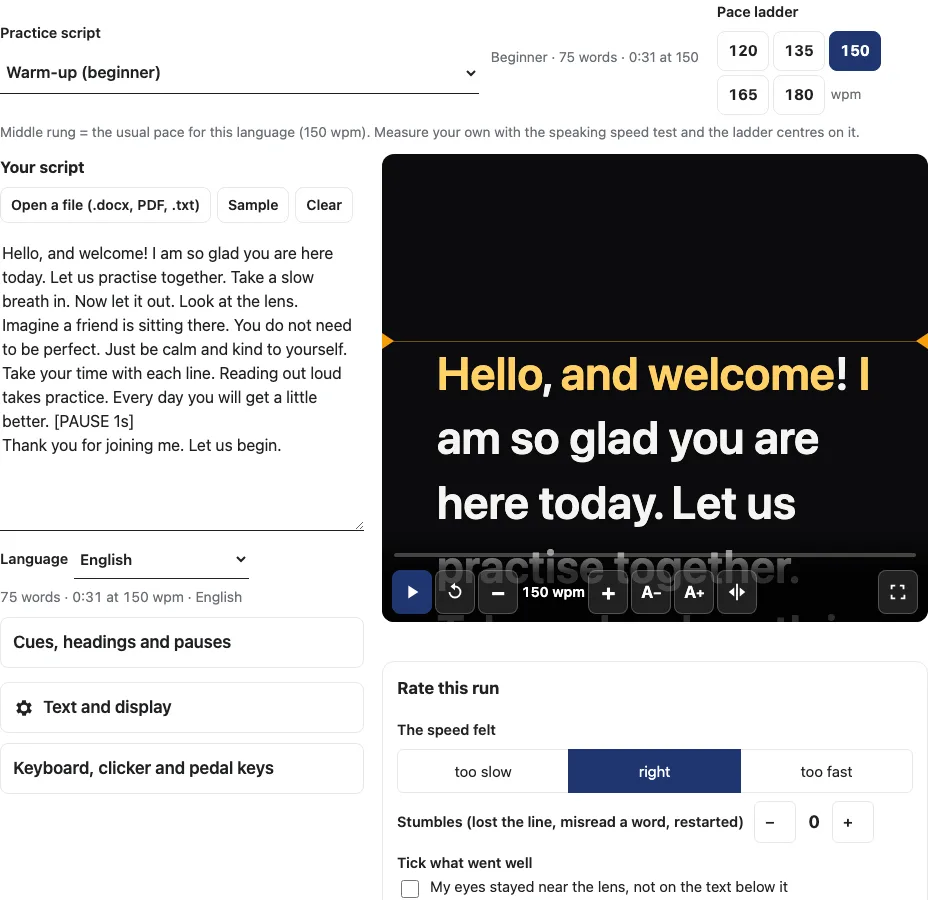
How to practise reading from a teleprompter
- Optional: run the speaking speed test first. Your measured pace is saved in this browser and becomes the starting point for the pace ladder.
- Choose your text. Pick one of the six practice scripts, pick the read-aloud passage in one of the 12 other languages, or paste your own script.
- Choose a pace from the five-step ladder. Each step is 80%, 90%, 100%, 110% or 120% of your starting pace. Without a speed test, English starts at 150 words per minute.
- Start the prompter. It scrolls at a fixed speed in words per minute, so read to the line it is on and keep your eyes near the lens.
- When the text ends, check the time. The result compares your run with the plan and includes the pauses written into the script.
- Rate the run: did the speed feel too slow, right or too fast? Count your stumbles (lost the line, misread a word, restarted).
- Tick the checklist: eyes near the lens, head still, breathed at full stops, kept going after a stumble, sounded like talking rather than reading.
- Move to the pace the tool suggests for your next run, then repeat.
Your runs are saved in this browser only. Use Clear history to delete them. To check eye contact and sound on video, use the Teleprompter for video page to record a take on your device, or the Follow my voice mode where your browser supports on-device recognition.
What are the best practices for using a teleprompter?
Good teleprompter reading comes down to a few habits you can practise and score: stay close to the lens, keep your head still, breathe at full stops and keep going when you slip. The checklist after each run tracks exactly these points, so you can see which one needs work.
- Keep your eyes near the lens, not glued to the text.
- Hold your head still and let your eyes do the moving.
- Breathe at full stops rather than mid-sentence.
- If you lose a line, keep going. Recovering without restarting is a skill you can practise.
- Read in phrases, so your voice sounds like talking rather than reading aloud word by word.
What’s the best scroll speed for beginners?
There is no single correct speed, but the tool sets five options around your own pace. Without a speed test, English starts at 150 words per minute, which gives the five rungs below. Rounding is to the nearest 5 words per minute.
| Rung | Share of starting pace | English speed (wpm) |
|---|---|---|
| 1 | 80% | 120 |
| 2 | 90% | 135 |
| 3 | 100% | 150 |
| 4 | 110% | 165 |
| 5 | 120% | 180 |
How the pace ladder works
After each run, the rule decides the next rung. If the pace felt too fast or you had 3 or more stumbles, move one rung slower. If it felt right with 0 to 1 stumbles, or felt slow with up to 2 stumbles, move one rung faster. Otherwise stay where you are. The page shows the fastest pace you rated right with at most one stumble.
Worked example: you measured 171 words per minute on the speaking speed test. The page rounds it to 170 and builds the ladder 135, 155, 170, 185 and 205. You read the Warm-up at 170, rate it “right” with no stumbles, and the next run is set to 185. At 185 you stumble three times, so the run after that goes back to 170.
Which practice script should I start with?
Start with the level that matches your current reading, and move up when a script feels easy. The table lists what each script trains.
| Script | Level | Length | What it trains |
|---|---|---|---|
| Warm-up | Beginner | 75 words (about 30 s at 150 wpm) | Settling in at an easy pace |
| Course welcome | Beginner | About 145 words | Reading connected, friendly sentences |
| Product update with numbers | Intermediate | Dates, a price, percentages, counts and times | Reading figures without stumbling |
| Local news report | Intermediate | About 225 words | Names and numbers together |
| Articulation | Advanced | Hard consonant clusters such as sixths and twelfths | Clear pronunciation of difficult word combinations |
| Explainer with cues | Advanced | About 300 words | Three headings and [PAUSE 2s], [SLOW], [LOOK UP] cues |
More about practice runs
How do I use a teleprompter for YouTube videos?
Put the screen with the prompter as close to the camera lens as you can, ideally right under it, so reading keeps your eyes near the lens. Record a practice take on the Teleprompter for video page to check your eye contact and sound.
What does the time at the end of a run mean?
The prompter runs at a fixed speed, so the end-of-run time shows how long the run took compared with the plan. Pauses written into the script are included in that time.
Is my practice history saved?
Runs are kept in this browser only, with the date, script, pace, rating, stumbles, checklist score and time. Clear history deletes them.
What speaking pace is normal?
In VirtualSpeech’s 2026 analysis of 32,809 practice presentations, the middle half of speakers spoke between 86 and 133 words per minute, with a median of 111. Conversation is usually about 120 to 150 words per minute.
How this tool works and where the numbers come from
Ladder steps are 80, 90, 100, 110 and 120 % of your measured pace (speaking speed test, stored in this browser) or of the language default, rounded to 5 words per minute (10 characters per minute for Japanese, Chinese and Korean). Word counts and reading times come from the Prompterline core. The English practice scripts were written for this page; the passages in other languages are the core’s read-aloud passages. Checked in headless Chromium on 2026-10-25 at 375 and 1280 px.
Sources
Questions, briefly answered
How often should I practice with a teleprompter?
The tool does not set a schedule, but short sessions repeated often are easier to keep up than one long session. Run one script, rate it, and go again, so each session builds on the last rating.
How long does it take to get comfortable reading a teleprompter?
There is no fixed time, because it depends on how often you practise and how hard the script is. The run history shows your progress: watch the stumble count fall and the checklist score rise across runs.
How do I avoid sounding robotic when reading?
Understand what you are saying before you read it, then read in phrases instead of word by word. Breathing at full stops and pausing where the script marks [PAUSE 2s] also keeps your delivery natural.
Why practise with tongue twisters or hard words?
Hard word combinations are where most stumbles happen, so practising them directly reduces stumbles in real use. The Articulation script uses consonant clusters such as sixths and twelfths for this reason.
Should I memorize scripts instead of using a teleprompter?
Memorizing short lines is fine, but longer scripts are hard to hold in memory and easy to forget under pressure. A teleprompter lets you keep your eyes near the lens while the words stay in view, so practise with it until the reading sounds natural.
Is there a teleprompter app that moves as I speak?
The Follow my voice mode moves the text as you speak, where your browser supports on-device recognition. The default prompter runs at a fixed speed in words per minute. See the voice activated teleprompter page for more on this mode.
How do I know if my pace is right?
Rate each run as too slow, right or too fast. If you rated it right with at most one stumble, that pace is a good target, and the page shows your fastest such pace.
Can I practise in languages other than English?
Yes. A short read-aloud passage is available in Spanish, French, German, Italian, Dutch, Brazilian Portuguese, Japanese, Traditional and Simplified Chinese, Korean, Russian and Arabic. For Japanese, Chinese and Korean, pace is measured in characters per minute.
Related tools
- Online teleprompter — Use this when you want a plain prompter to read your own text.
- Speaking speed test — Use this first to measure your starting pace for the ladder.
- Teleprompter for video — Use this to record a take and check eye contact and sound.
- Voice activated teleprompter — Check whether your browser can follow your voice on the device.
- Teleprompter speed — Use this to compare speeds and choose a comfortable scroll rate.
- What Is a Teleprompter: see how the glass and screen work.
- Teleprompter guides: the whole group in one place.