
Teleprompter Speed and Font Size
Teleprompter speed is the scroll rate, in pixels per second, that moves one line in the time it takes you to say it. Enter your pace, font size, line height and text width to get the scroll speed in pixels per second, lines per minute and time to cross the screen. A different font size or width always needs a new calculation.
Free · runs in your browser · nothing is uploaded
At a glance
Teleprompter speed is the rate at which the text must scroll so that one line moves in the time it takes you to say it. Pixels per second equals lines per minute times line height in pixels, divided by 60.
- Lines per minute equals your pace divided by the units per line, and pixels per second equals lines per minute times line height in pixels, divided by 60.
- The reading range of 0.2 to 2 degrees of x-height is taken from Legge and Bigelow (2011), and the three presets inside it (0.2, 0.5 and 0.9 degrees) are the page's own choice.
- Words are the default unit, and the calculator counts one em per character for Japanese, Chinese, Korean and Thai.
- At 150 words per minute, a 48 px font, a 1.4 line height and a 600 px wide column, the scroll is 34.2 lines per minute and 38.3 pixels per second.
- The font size needed is calculated from the viewing distance, the screen diagonal and the chosen angle, using the x-height ratio of the font this page uses (about 0.5).
Last checked:
How to set your teleprompter speed
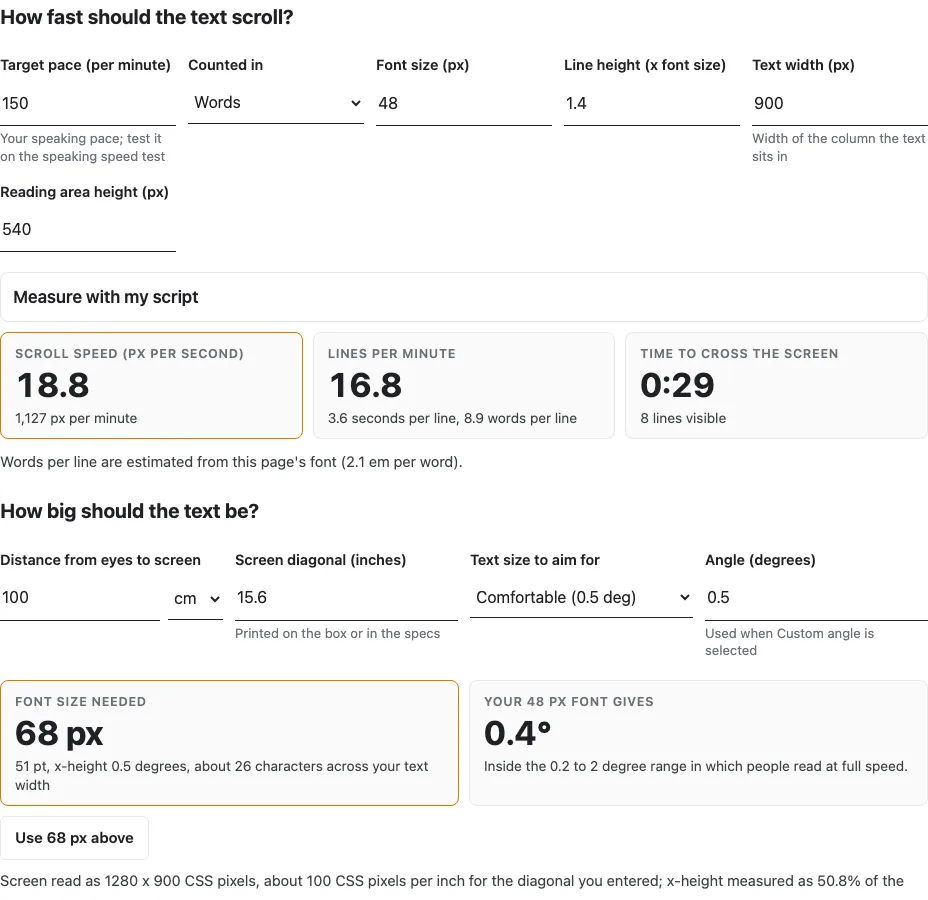
- Enter your Target pace. If you do not know it, run the speaking speed test; a saved result is used here automatically. Words are the default unit; choose characters for Japanese, Chinese, Korean or Thai.
- Enter the Font size, Line height and Text width your prompter uses. The width is the column the text sits in, in CSS pixels.
- Read Scroll speed in pixels per second, Lines per minute and Time to cross the screen.
- For an exact figure, open Measure with my script and paste the text. The page wraps it at your width and font size and counts the real lines.
- In part two, enter the Distance from eyes to screen, the Screen diagonal and the Text size to aim for. Read the Font size needed, and press Use … px above to feed it into part one.
- Copy the Your settings block into your notes or your prompter app.
- If the text feels too fast or slow once you are on camera, change the pace by 5 and read the new speed rather than guessing a slider position. A different font size or width always needs a new calculation, because the same slider number moves a different number of words.
How do I convert words per minute to a scroll speed?
Divide your pace by the words that fit on a line to get lines per minute, then multiply by the height of a line. For example, take 150 words per minute, a 48 px font, a line height of 1.4 and a 600 px wide column: taking 2.85 em per word, the column holds 4.4 words per line (600 / (48 x 2.85)), so the text must move 150 / 4.4 = 34.2 lines per minute. A line is 48 x 1.4 = 67.2 px, so the scroll is 34.2 x 67.2 / 60 = 38.3 pixels per second, and one line passes every 1.75 seconds.
The same pace at other settings changes the speed a lot. SayScroll’s table shows the effect in lines: 130 words per minute is 22 lines per minute at 6 words per line, 16 at 8 and 13 at 10. Doubling the font size halves the words per line, so it doubles the lines per minute and quadruples the pixels per second. This is why the same speed number moves a different number of words on another screen. Teleprompter Pro’s guide says the same: a smaller text size means more words scroll in the same time.
| Pace | Lines per minute (6 words per line) | Pixels per second (48 px font, line height 1.4) |
|---|---|---|
| 100 | 16.7 | 18.7 |
| 130 | 21.7 | 24.3 |
| 150 | 25.0 | 28.0 |
| 170 | 28.3 | 31.7 |
What font size should a teleprompter use?
Large enough that the letters subtend a comfortable angle from where you sit. Legge and Bigelow’s review (2011) found that people read at full speed when the x-height, the height of a lowercase letter such as x, is between 0.2 and 2 degrees of visual angle. At a normal reading distance of 40 cm that is 1.4 mm (about 4 points) to 14 mm (about 40 points). A prompter is usually 1 to 2 metres away, so the text must be much larger on the screen.
The calculator uses three presets inside that range, which are our choice, not a standard: 0.2 degrees as the smallest size that still reads at full speed, 0.5 as comfortable, and 0.9 as large. For a 15.6 inch laptop screen with 1536 x 864 CSS pixels and a font whose x-height is half its size, the font sizes are:
| Distance | 0.2 degrees | 0.5 degrees | 0.9 degrees |
|---|---|---|---|
| 50 cm | 16 px | 39 px | 70 px |
| 100 cm | 31 px | 78 px | 140 px |
| 150 cm | 47 px | 116 px | 210 px |
| 200 cm | 62 px | 155 px | 279 px |
At 100 cm, a 48 px font gives 0.31 degrees: inside the reading range but smaller than the comfortable preset. Bigger text means fewer words per line, which raises the scroll speed in pixels per second, so settle the font size first and then the speed.
How is the font size calculated from the distance?
The x-height that fills an angle of a degrees at a distance d is 2 x d x tan(a / 2). That is 0.87 cm for 0.5 degrees at 100 cm. The tool turns centimetres into screen pixels with the screen diagonal you enter and the screen size the browser reports (about 113 CSS pixels per inch in the example), then divides by the font’s x-height ratio to get the font size. It measures the ratio of the font this page uses. Your prompter’s font may differ by a few percent. Browsers report CSS pixels, so a high-resolution screen is handled correctly. The diagonal is the one number the browser cannot know: enter the size of the screen you actually read from, not another display.
What speaking speed should I set?
Start at your measured pace. Published guidance for prepared reading is close to ordinary speaking ranges: ReadCalc starts at 140 words per minute (2 August 2026), RemoteCue suggests 130 to 150 for corporate video and GoTeleprompter 140 to 160 for creators on camera. These are tool vendors’ suggestions, not research. VirtualSpeech lists 100 to 150 words per minute as a comfortable presentation pace. If a take feels rushed, lower the pace by 5 words per minute at a time.
How this tool works and where the numbers come from
Lines per minute = pace / units per line. Pixels per second = lines per minute x line height in pixels / 60. Units per line = text width / (font size x em per unit); em per word is measured on a 54-word English passage in this page’s own font (roughly 2.3 to 2.9 depending on the font) and 1 em per character for Japanese, Chinese, Korean and Thai. With a pasted script, lines are counted by wrapping the words at your width. Font size = x-height / x-height ratio, where x-height = 2 x distance x tan(angle / 2) and the ratio is measured from this page’s font (about 0.5). The reading range of 0.2 to 2 degrees of x-height is from Legge and Bigelow (2011); the three presets inside it (0.2, 0.5 and 0.9 degrees) are our choice.
Sources
- Legge and Bigelow (2011), Does print size matter for reading? A review of findings from vision science and typography, Journal of Vision 11(5):8
- Teleprompter Pro guide, Main Interface (speed number and text size), read 2026-10-25
- SayScroll, Teleprompter Scroll Speed (lines per minute table), published 7 September 2026
Questions, briefly answered
How fast should a teleprompter scroll?
At the speed that moves lines at the rate you speak. For 150 words per minute and 6 words per line that is 25 lines per minute. The pixels per second depend on your font size and line height; the calculator gives the number.
What WPM should I set my teleprompter to?
Your own speaking pace, rounded to 5. Vendors suggest 130 to 150 for corporate video and 140 to 160 on camera. Measure yourself with the speaking speed test.
How do I calculate my speaking speed?
Read a text of known length aloud against a timer and divide the words by the minutes. The speaking speed test does it with built-in passages.
What is a good speaking speed for a presentation?
VirtualSpeech lists 100 to 150 words per minute as a comfortable pace for presentations and recommends aiming for about 120 to 160.
What font size should I use for a teleprompter?
It depends on the distance. At 1 metre on a 15.6 inch laptop, a comfortable size (0.5 degrees) is about 78 px; at 2 metres it is about 155 px. Enter your distance and screen to get yours.
Does a larger font need a faster scroll?
Yes, in pixels per second. Doubling the font size halves the words per line, so the lines per minute double, and each line is also twice as tall, so the pixels per second quadruple.
Is there a teleprompter that follows my voice instead of a fixed speed?
Some apps scroll with your speech recognition. A fixed speed is a bet that you will not change pace; this page gives you the right number for that bet. The Prompterline prompter is the place to try the settings.
Does the calculator work for Japanese or Chinese?
Yes. Choose characters as the unit: the calculator counts one em per character and the pace in characters per minute, such as 300 for Japanese.
Related tools
- Speaking speed test: measure the pace to enter above.
- Script timer: time the script you will scroll.
- Speech length calculator: check the script fits the slot.
- How many words is a 5-minute speech: the word count for a given length.
- Script Formatter: clean a script so it reads well on a teleprompter.
- Script timing tools: the whole group in one place.