
Voice Activated Teleprompter
A voice activated teleprompter moves your script as you speak, using only your browser's on-device speech recognition. It runs in desktop Chrome 139 and later, and the text waits when you stop talking. It is not speech-to-text, and no transcript is kept.
Free · runs in your browser · nothing is uploaded
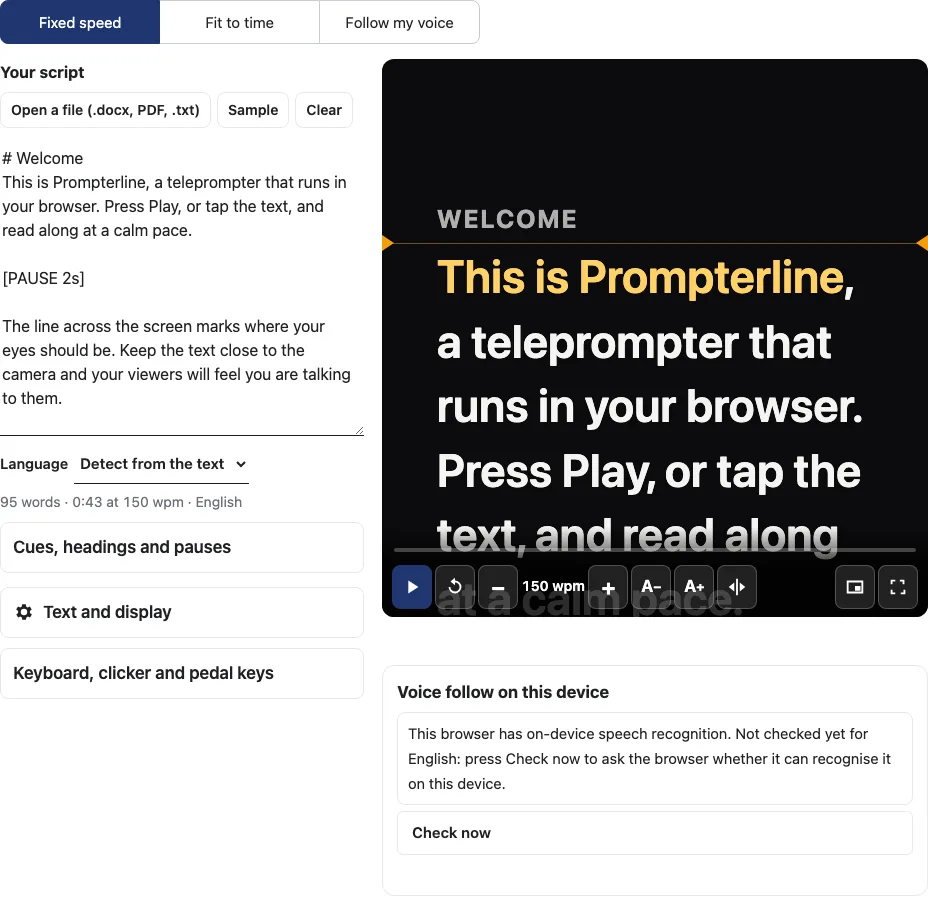
A voice activated teleprompter moves the script by listening to you instead of scrolling at a set speed. Here that is the Follow my voice mode: you read at your own pace and the text keeps up. The page switches it on by itself only if your browser can recognise speech on the device, and the panel under the prompter says what it found for your script’s language. It is not speech-to-text: the recognised words only locate your place in the script and no transcript is kept. If your browser cannot do it, Fixed speed and Fit to time still work.
The free plan includes 5 completed prompting sessions per month, with or without recording. Pro includes unlimited sessions.
Paste your script into the tool on this page and read the “Voice follow on this device” panel before you start reading aloud.
At a glance
A voice activated teleprompter moves the script to match the words you speak, so you read at your own pace. It runs only where your browser can recognise speech on the device, and it uses the recognised words only to find your place in the script.
- Voice follow works in desktop Chrome 139 and later, where the browser offers on-device recognition.
- The free plan includes 5 completed prompting sessions per month, with or without recording.
- The matching uses the last 8 recognised words, or about 18 characters in Japanese, Chinese, Korean and Thai.
- The page never falls back to a cloud recogniser, so if the language is not ready, voice follow is not offered.
- Voice follow checks 27 script languages, and the "Check all languages" button shows which are ready or downloadable in your browser.
- The recognised words are only used to find your place, and they are not stored.
How to use the voice activated teleprompter
- Paste your script into the page.
- Check the language setting. The panel “Voice follow on this device” shows the result for that language.
- If the panel says “possible after a one-time download”, click Download in the mode switch above the prompter. Wait until the status reads ready.
- Follow my voice is selected for you when the browser reports the language as ready; you can switch back to Fixed speed at any time.
- Allow microphone access when the browser asks.
- Start reading. The text advances as you speak and waits during silence.
- If the panel says “not available”, choose Fit to time, or Fixed speed if you measured your pace on the speaking speed test on this device.
- To see which of the 27 script languages are ready or downloadable, press “Check all languages”.
In your script, put stage notes in [square brackets]. They are shown but not read aloud. Write [PAUSE 2s] to hold the scroll for two seconds in Fixed speed and Fit to time, and start a line with # to make a heading.
You can test the matching before you read aloud: the simulation below the prompter runs in any browser, with no microphone, and shows how the text would follow a reader who skips, ad-libs or reads a line twice.
How does voice-activated scrolling work?
The teleprompter takes the last few words your browser recognised and lines them up against your whole script to find where you are. It then moves the text to that point. Silence sends no updates, so the text waits until you speak again.
The matching uses weighted fuzzy alignment of the last 8 recognised words, or about 18 characters in Japanese, Chinese, Korean and Thai. It searches 40 words behind and 160 words ahead of your place first, then the full script after 3 updates without a usable match. Small forward moves apply at once. Larger jumps need a stronger match and usually a second confirming update. Backward wobble of 1 to 3 words from recogniser revisions is ignored.
Which browsers support voice follow?
Voice follow works in desktop Chrome 139 and later, where the browser offers on-device recognition. Other browsers in the table below do not offer it, and the page then uses Fit to time or Fixed speed instead. Edge follows Chrome in the compatibility data, but the page checks what the browser can actually do rather than trusting the browser name.
| Browser | On-device recognition |
|---|---|
| Chrome 139 and later, desktop | Available |
| Chrome for Android | Not available |
| Safari on Mac, iPhone, iPad | Not available |
| Firefox | Preview builds only |
| Edge | Follows Chrome data; page uses live check |
Source: MDN browser compatibility data, read 2026-10-25.
How accurate is the voice following?
In the core benchmark, the position was within 2 words of the spoken words 99% of the time in English and German, and 98% in Arabic. For the character-based languages, it was within 4 characters 98% of the time in Japanese, 99% in Traditional Chinese and 98% in Korean.
| Language | On the right place | Catch-up after a skip or re-read (median / 90th percentile) |
|---|---|---|
| English | within 2 words, 99% | 1.2 s / 1.6 s |
| German | within 2 words, 99% | 1.2 s / 1.2 s |
| Arabic | within 2 words, 98% | 1.2 s / 1.2 s |
| Japanese | within 4 characters, 98% | 0.8 s / 1.6 s |
| Traditional Chinese | within 4 characters, 99% | 0.6 s / 1.4 s |
| Korean | within 4 characters, 98% | 0.6 s / 1.4 s |
| Thai | within 5 characters, 99% | 1.0 s / 1.4 s |
The benchmark ran 20 times per language on a simulated recogniser with 8% misheard words, 3% dropped words, 3% fillers and 10% revised partial results. Each update took 0.09 ms on average, even on a 30,000-word script (benchmark of 2026-10-23 on a Mac with an M1 Max; phones are slower). These are simulated recogniser errors, not a real microphone: your results depend on the recogniser, your microphone and the room.
What happens if I go off-script or skip a section?
The prompter searches for your new place and moves there once it finds a confident match. The page’s simulation shows how this plays out on the 92-word demo script.
| Simulated reading | Result |
|---|---|
| Reads straight | Within 2 words in 100% of 108 updates |
| Skips about a third of the script | Found the new place in 1.2 s |
| Adds its own 10-word sentence | Moved at most 5 words; back on the line 1.1 s after the reader returned |
The simulation also offers a re-read option and a noisy room with 20% misheard words, which you can try the same way.
When voice follow is not available
Does it work on Android or Windows?
Voice follow works on Windows in desktop Chrome 139 or later, and Edge is checked live. It does not work in Chrome for Android, so Android users should choose Fit to time or Fixed speed.
What if voice follow is not available on my device?
Choose Fit to time to set a scroll speed that ends the script at a target time. If you have measured your pace on the speaking speed test on this device, you can choose Fixed speed at your own words per minute.
How this tool works and where the numbers come from
Voice follow starts only after SpeechRecognition.available({processLocally: true}) reports the language as available, and processLocally is set before every start; otherwise the mode is not offered. Matching is the Prompterline core’s alignment (weighted fuzzy local alignment of the last 8 words with the script). Accuracy figures come from the core benchmark of 2026-10-23 with a simulated recogniser; the simulation on this page uses the same code. The live check was tested in headless Chromium with a stubbed speech API (available, downloadable, no API); real on-device recognition with a microphone was not tested.
Sources
- MDN, Using the Web Speech API: server-based recognition by default, on-device recognition with processLocally and language packs (page modified 2026-08-31), read 2026-10-25
- MDN, SpeechRecognition.available() browser compatibility (Chrome 139 desktop; not Chrome for Android or Safari; Firefox preview), read 2026-10-25
- MDN, SpeechRecognition.processLocally, read 2026-10-25
Questions, briefly answered
Is there a free teleprompter that is voice-activated?
Yes. You get 5 free prompting sessions per month, including sessions in Follow my voice mode. That mode appears only where your browser can recognise speech on the device, so check the “Voice follow on this device” panel first. It is automatic in that sense: the text follows you, or you can set a speed or Fit to time.
Is there a teleprompter app that moves as I speak?
This page does that in Follow my voice mode, where the text advances as you speak and waits during silence. It runs in the browser rather than as an installed app, and the mode needs desktop Chrome 139 or later.
Does it work without internet?
Voice follow uses on-device recognition, which needs a one-time language pack download for each language. After that download, MDN notes that the recognition works offline. The page never falls back to a cloud recogniser, so if the language is not ready, voice follow is not offered.
What languages does it support?
Voice follow checks 27 script languages. Press “Check all languages” to see which are ready or downloadable in your browser, because availability depends on the device. The simulation includes passages in 13 languages.
Does it work on iPhone, Android, Safari or Firefox?
Voice follow is not offered on iPhone, iPad, Safari on Mac, Chrome for Android, or Firefox outside preview builds. On those devices, use Fit to time or Fixed speed. The simulation runs in every browser without a microphone.
Is my script private, and is my voice sent anywhere?
Voice follow recognises speech on your device. If the browser cannot do that, the page sends nothing anywhere. The recognised words are only used to find your place, and they are not stored.
Is a voice activated teleprompter the same as speech to text?
No. Speech-to-text writes out everything you say. This teleprompter uses the recognised words only to locate your position in the script, and it does not produce or keep a transcript.
Can I add stage directions or notes I don’t want to read out loud?
Yes. Put them in [square brackets]. They appear on screen but are not read or matched, and they do not hold the prompter.
Related tools
- Online teleprompter: Use this for a standard teleprompter with manual or timed scrolling.
- Speaking speed test: Measure your words per minute so Fixed speed matches how you talk.
- Teleprompter for video: Use this when you are recording yourself on camera.
- Teleprompter practice: Use this to rehearse a script before the real take.
- Teleprompter for Zoom: Use this when you are presenting on a video call.
- What Is a Teleprompter: see how the glass and screen work.
- Teleprompter guides: the whole group in one place.